
Unboxing


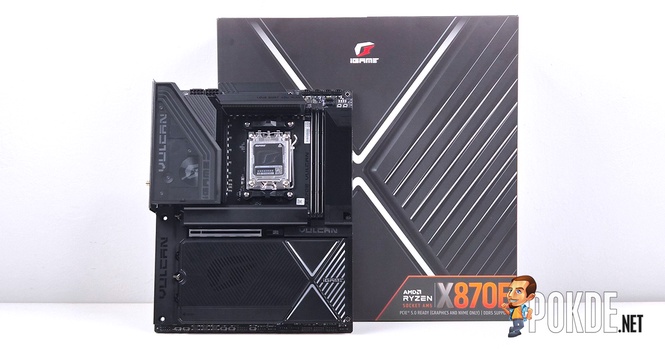
Chinese-based PC components maker COLORFUL launched the flagship iGame X870E Vulcan OC motherboard early this year looking to conquer records, as evident by its specific design choices catering to extreme overclocking uses. We got one such unit to take a look at, and to begin, the presentation of this motherboard is sure worthy of a flagship.
Opening the box will not quite reveal the motherboard just yet; it’s fully protected by the soft foam throughout to make sure this precious cargo is safe to the owner’s hands. Remove the motherboard and its foam from the box, and you get access to the accessories box that includes quite a few items to get started.


There’s a lot to unpack here – for starters, you’re given four SATA cables if you have a lot of such storage mediums at bay (it’s rare to see motherboards provide this much cables, usually it stops at one or two), plus additional combo connectors for USB 2.0 and front panel to help you deal with any peripheral that doesn’t feature pre-combined connectors. A USB flash drive is given for quick driver installations, along with a separately packaged Wi-Fi 7 antenna.
COLORFUL understands that SSD thermal pads will need to be changed at some point, so it provides the user with copious amounts of spare thermal pads in case they do break or degrade due to aging. Note that these are custom-cut for their respective slots (i.e. primary slot, the remaining four slots) with specific sides to be attached to – the base plate uses thicker 0.75mm pads, while the heatsink interface uses thinner 0.5mm pads instead. Make sure not to mix them up as incorrect pads will cause inadequate surface contact.
Also, the iGame X870E Vulcan OC also comes included with a GPU stand, so it’s safe to say the company knows that whoever uses this motherboard for their PC build is going to pair it with an uber-expensive, uber-heavy GPU, hence no harm to include it as extras (fun fact, it’s the same ones as you get on COLORFUL-branded GPUs). There’s also a pair of gloves, and these are no ordinary ones, of course – these are anti-static gloves that you’ll want to wear just so static electricity doesn’t damage this highly valuable motherboard.


But wait, there’s even more! That white box is actually a full magnetic screwdriver set, with 24 bits included covering Philips, flathead, Torx, Y-shaped and several other uncommon form factors; rest assured though, all screws found on this motherboard are exclusively using Philips formats, in varying sizes (although ironically you might not be able to access through all of them due to an odd design quirk, which we’ll discuss in a bit).
Walkaround


When you see most of the motherboard’s surface are are covered in metal bits, that’s usually a sign that says this motherboard is a particularly premium one. Only the necessary bits are exposed, including the CPU socket, RAM slots, PCIe 5.0 x16 slot, and a majority of the headers and switches. Equally, the rear is also covered by a giant backplate that acts as a heatsink for its VRM.


The VRM heatsink is unsurprisingly a huge unit featuring a transparent layer on top of the space-like design, while on the right side of the RAM slots you’ll find a display module that mostly serves aesthetic purposes. The module can be removed via two screws on the back (you’ll need a very thin screwdriver to access them), but that won’t affect the functionality as far as hitting the power button goes. The three buttons you see above are simply a plastic extension that reaches all the way down to hit the surface-mounted buttons on the motherboard.
Below the CPU socket you’ll find heatsinks for SSDs, locked using a spring-loaded latch which you need to push clockwise to unlock. All SSD latches inside opt for standard rotating latches, which is a fairly tested design despite brands like ASUS and MSI having novel ideas on minimizing the steps required for SSD installations.


On the subject of latches, here’s one design oddity we found on this motherboard. The primary PCIe slot is secured via a push button-style locking mechanism similar to the ones on MSI’s; however, given that the right side of the motherboard is occupied by a display module, this PCIe release button is hidden under a layer which doesn’t tell you the locking state. As in, you can’t tell whether the slot is locked or unlocked once the GPU is installed – a design oversight, we think.


Moving downwards, COLORFUL also provides the secondary PCIe slot a dedicated slot cover, which is there most likely due to aesthetics. That said, it works as a protection against dust accumulation, too. We also found another common design feature in high-end motherboards – side-facing connectors. These are labeled both through the markings on the motherboard itself, although that’s not visible unless you disassemble the entire thing, so it’s labeled accordingly on the SSD heatsink and the display module as well. (We also wants to point out the 8-pin PCIe connector is for 60W USB Power Delivery feature on its USB 20Gbps header.)

For it’s I/O, the COLORFUL iGame X870E Vulcan OC features 10 USB-A ports in various speed ratings, plus two USB4 ports for high-speed connections; there is also 5GbE LAN port, Wi-Fi 7 antenna connectors, and the usual audio ports. Those are the standard part – one uncommon feature here is the PS/2 port for vintage mouse and keyboards. Overclocker enthusiasts will know this is solely for minimizing CPU overhead handling USB devices to eke out that last bit of benchmark scores, and in the similar fashion, you won’t find any onboard display outputs here, so bring your own GPU if you want to get this motherboard up and running.
Over at the top of the I/O, there are also three buttons: a Turbo button, a BIOS update button, and the CMOS reset button. The latter two are self-explanatory, so let’s explain what the Turbo button does. According to COLORFUL’s documentation, pressing this key will automatically enable Precision Boost Overdrive (PBO), a +150MHz overclock on the involved Ryzen processor, and simultaneously the processor’s AVX-512 functions will be disabled to ensure stability. This can only be activated when the system is off, otherwise it’ll apply the settings on the next reboot.


For a flagship motherboard, the RGB lighting is fairly understated on this one. You’ll only find one strip of RGB lighting on the VRM heatsink, while the right side is a dedicated display for system monitoring and customization functions, similar to AIO cooler displays. You must install the iGame Center application to configure the display, though the LED itself (and the display power) can be switched off directly by flipping the LED_DIS switch at the bottom of the motherboard when the system is on, or LED_DEMO when the system is off (but connected to a power source).
Specifications
COLORFUL iGame X870E Vulcan OC
Full specifications available in product webpage.
| CPU Support | Socket AM5 (AMD Ryzen 7000, 8000, 9000 series) |
| Form Factor | ATX (12 x 9.6 in / 305 x 244 mm) |
| Chipset | AMD X870E (2x Promontory 21) |
| Power & VRM | 2x EPS 8-pin 18+2+2 stage (Vcore+SoC+MISC) Vcore+SoC: Renesas RAA2209004 (110A per powerstage) MISC: Renesas (Intersil) ISL99390 (90A per powerstage) PWM Controllers: – Renesas RAA229620 12-phase controller (Vcore+SOC) – Renesas (Intersil) ISL68220 2-phase controller (MISC) |
| Memory | 2-slot, single-sided latch Max. 128GB dual-channel unbuffered Max overclocking frequencies: – DDR5-8600+ (Ryzen 9000 series) – DDR5-10400+ (Ryzen 8000 series) – DDR5-8000+ (Ryzen 7000 series) |
| PCIe Expansion Slots | 1x PCIe 5.0 x16 (CPU) 1x PCIe 4.0 x4 (x16 slot, Chipset) |
| Storage | 4x SATA 6Gb/s 5x M.2 slots: – 1x PCIe 5.0 x4 (CPU), M.2 22110/2280 – 2x PCIe 5.0 x4 (CPU), M.2 2280* – 2x PCIe 4.0 x4 (Chipset), M.2 2280 *When M.2_2 / M.2_3 are in use, PCIe 5.0 x16 slot falls back to x8 mode. |
| Networking | MediaTek MT7927 (AMD RZ738) Wi-Fi 7 module* (M.2 Key-E) Bluetooth 5.4 Realtek RTL8126 5GbE LAN *Wi-Fi 7 support requires Windows 11 24H2 and later |
| USB Ports | Rear: 2x USB4 (40Gbps) 4x USB 3.2 Gen 2 (10Gbps) Type-A 4x USB 3.2 Gen 1 (5Gbps) Type-A 2x USB 2.0 1x PS/2 keyboard & mouse input Front (headers): 1x USB 3.2 Gen 2×2 (20Gbps) with 60W Power Delivery support 1x USB 3.2 Gen 1 (5Gbps) (splitting to 2x USB 3.2 Gen 1 ports) 2x USB 2.0 (splitting to 4x USB 2.0 ports) |
| Onboard Display | None |
| Audio | Realtek ALC1220 codec ESS Sabre ES9219Q DAC 24-bit/192kHz audio Rear I/O: 1x Mic-in 1x Line-out 1x S/PDIF (TOSLINK optical out) |
| Peripheral Headers | Fan and Cooling 2x CPU fan (CPU_FAN) 4x System fan (CHA_FAN) 2x Water cooling pump (AIO_PUMP) USB Power Delivery 1x PCIe 8-pin connector (PCIE_8P) Miscellaneous 1x Front panel (F_PANEL) 1x Front audio (F_AUDIO) 1x BIOS external flashing (JBIOS) 1x Speaker (SPEAK) 1x RSVD pins (RSVD) 4x Addressable RGB LED connectors (5V_ARGB) Additional CPU voltage probe points (GND, VDDCR, MISC, VDDIO, VDDCRSOC) |
| Accessories | User guide Quick start guide Sticker pack 4x SATA cables 2x 3-pin ARGB extension cables M.2 screw packages 0.75mm M.2 thermal pads 0.5mm M.2 thermal pads 10x cable ties Wi-Fi 7 antenna Front panel combo header USB 2.0 combo header USB flash drive Anti-static gloves GPU support stand 24-bit magnetic screwdriver set |
Test System
| CPU | AMD Ryzen 9 9950X |
| Cooling | Cooler Master MasterLiquid PL360 Flux 30th Anniversary Edition Thermal Grizzly Kryonaut |
| Motherboard | > COLORFUL iGame X870E Vulcan OC |
| GPU | NVIDIA GeForce RTX 5090 Founders Edition |
| Memory | G.Skill Trident Z5 Neo RGB DDR5-6000 CL28 (2x16GB) |
| Storage | ADATA XPG MARS 980 BLADE 1TB |
| Power Supply | Cooler Master MWE Gold 1250 V2 Full Modular (ATX12V 2.52) 1250W |
| Case | VECTOR Bench Case (Open-air chassis) |
| Operating System | Windows 11 Home 25H2 |
Teardown
Cooling


There is no shortage of cooling surfaces to cool all the heat-generating components on the COLORFUL iGame X870E Vulcan OC – all SSDs are covered in base plates and heatsinks with corresponding thermal pads on each side, while the primary SSD also enjoys a full-length fin stack to keep things cool. Same goes to the VRM, which already doesn’t require a whole lot of cooling thanks to its extremely beefy and overbuilt power delivery setup. The X870E chipsets and the USB4 controller also gets dedicated heatsinks, so there’s almost no chance you’ll find any parts overheating on this motherboard so long as they are installed properly.
VRM


And speaking of VRM, this COLORFUL motherboard is a serious piece of kit. Its 18+2+2 stage setup features 110A DrMOS powerstages for the Vcore and SoC, while MISC gets 90A powerstages as well; additionally, each group of MOSFETs also get their own dedicated PWM controllers, which is a design we have not seen in other motherboards we have tested here. Suffice to say, this motherboard is going to handle just about anything extreme overclockers (and the processor) can throw at it.
Storage & Expansion

The 20 lanes of PCIe 5.0 (not counting 4 lanes dedicated to chipsets) from the Ryzen processor are, as usual, split into PCIe x16 and PCIe x4 configurations; in this case, the GPU x16 slot can be further bifurcated to allocate bandwidth to two extra SSD slots (M.2_2, M.2_3), meaning it operates at x8/x4/x4 mode once either of the SSD slots are populated. The two X870E chipsets are relatively underutilized in this case, only focusing on two more SSD slots (M.2_4, M.2_5), a secondary PCIe slot (PCIe 4.0 x4), plus 4x SATA and a limited number of high-speed USB ports.
LAN & Wi-Fi


For its network connectivity, the COLORFUL iGame X870E Vulcan OC uses Realtek RTL8126 chip to handle wired internet, rated for 5Gbps via its LAN port; as for Wi-Fi, the motherboard uses MediaTek MT7927 Wi-Fi 7 chip (also called AMD RZ738), which is a standard issue among high-end AMD motherboards capable of transmitting 320MHz radio, unlike the MT7925 160MHz module found on cheaper models (which many consider it inferior given that it doesn’t support Wi-Fi 7’s primary feature, the 320MHz channel).
I/O & Controllers


Above are some of the components / controllers we found on the COLORFUL iGame X870E Vulcan OC motherboard, for reference.
Audio


The audio setup involves a Realtek ALC1220 codec paired with ESS Sabre ES9219Q DAC, along with four capacitors for signal filtration; it’s not particularly overbuilt in ways we saw some motherboards do with large number of capacitors or a high end codec, but all in all, respectable.
Other Features


There’s no shortage of overclocking-focused features on the COLORFUL iGame X870E Vulcan OC motherboard, featuring a dual BIOS switch (plus a secondary redundancy in the form of JBIOS header that allows data to be flashed right from the pins if all else fails), specialized CPU operating modes, base clock (BCLK) tuning, and voltage probe points for real-time external monitoring through multimeters. The RAM slots are also reduced to two for the same reason, which is a must-have for competitive memory overclocking.
Thermals


So how does this COLORFUL motherboard’s robust VRM system hold up when the Ryzen processor is pushed to the limit? It barely even flinched. A 15-minute stress test without any airflow would make most motherboard VRMs pretty toasty by the end of the test, but with a 18+2+2 stage, 110A system dealing with what conventional cooling methods would allow, the iGame X870E Vulcan OC barely went past 50°C even when the Ryzen 9 9950X is pushed to 250W of socket power, where our 360mm AIO is already saturated before the motherboard cooling comes remotely close to it.
BIOS & Software


Like most brands, the BIOS menu is split into simple and advanced mode catering to their respective audience, and similarly, you can also configure fan settings, check port status, add quick access entries, save presets, plus various other features. All in all, setting things up is a pretty straightforward affair.


The software responsible for UI-friendly tuning and – specific to this motherboard, the display customization – is all done through the iGame Center software. I do have to point out there are quite a few translation inaccuracies here, and I suspect a translate software is probably involved in this. As such, non-Chinese speakers will likely struggle to navigate through some of the functions.
Verdict

At the time of this writing, we have not seen any local pricing of the COLORFUL iGame X870E Vulcan OC motherboard, though it does have a price tag in its home turf China, costing 4,599 Yuan (~RM2,666 at current exchange rates). That’s a high price tag, but do keep in mind you’re looking at a flagship AMD motherboard with all the bells and whistles given to it – an equivalent ASUS motherboard would’ve made this model downright cheap even if you factor in taxes and import surcharges if it does sell here in Malaysia.
To be clear, if you just want a decent option for a gaming system, this one is perhaps more than overkill for that purpose. COLORFUL clearly designed this with overclockers in mind, and as such you do lose some creature comforts, like the lack of an onboard display output, in the pursuit of breaking overclocking records. Better options certainly exist if you prioritize user friendliness, but for breaking records? This might be a contender for conquering future leaderboards.

Special thanks to COLORFUL Technology for providing the iGame X870E Vulcan OC motherboard for this review.