

The way to stop chasing RSVPs on WhatsApp is to stop asking in chats. Send every guest the same RSVP link, let the replies land in one list that adds up the pax, and close replies about a week before your caterer needs the final number. Then you only message the people who haven't answered.
That's the whole method. The rest is the detail that makes it work at a Malaysian wedding, where half the invites go out through your parents and the family group chat.
Why chasing wedding RSVPs on WhatsApp never ends
Asking in chats feels personal, but it scatters the answers. One aunty replies "can, 4 people" in the family group. A colleague answers in a private chat three days later. Your mum takes a phone call and remembers the number, more or less. Nobody holds the full list, so you count, recount, and still don't trust the total.
Plenty of guests do answer. The trouble is that every answer lands somewhere different.
Step 1: Pick one place for every reply
There are two honest options.
The free one is Google Forms. From the form's Responses tab you can send every answer to a Google Sheet that both families can open. One catch: Google's help page says that if you turn on "Limit to 1 response", people must sign in to a Google Account to fill in the form. Some older relatives will stop right there, so leave it off and spot duplicates in the sheet yourself.
The other is the RSVP form on a wedding website. The invitation, the venue map and the reply sit on one link, and answers go straight into a guest list. More on that at the end.
Whichever you choose, that list is the only place a reply counts. When someone answers in a chat, thank them and type it in yourself.
Step 2: What to ask on the wedding RSVP form
Every extra question costs you replies. Ask these:
- Name, plus a phone number so you can spot the same family replying twice
- Coming or not
- How many people, including themselves and any children
- Bride's side or groom's side
- A vegetarian count, if your menu needs one
- Baby chairs, if your venue asks
Ask for one reply per family. If a husband and wife both reply "2", you've counted four people who are really two. Say it in the message.
Also decide how many people each invite covers. Otherwise "how many?" sometimes comes back as the whole extended family.
Step 3: Set the RSVP deadline from your caterer's date
Ask your caterer or banquet hall when they need the final number. Close RSVPs about a week before that. The gap is your chasing week, and you'll use all of it.
Write the deadline as a date in the first message, like "please reply by 15 November", not "as soon as possible".
Step 4: Send one message with the link
Send the same short message to everyone, and ask both sets of parents to forward it to their own guests.
If you're thinking of WhatsApp Broadcast, check one thing first. WhatsApp's help page says only people who have saved your number in their contacts receive a broadcast, and each list holds up to 256 contacts. Guests who never saved your number won't see it.
A wedding RSVP message like this works on WhatsApp:
Hi Auntie Mei! We're getting married on 6 December at [venue]. Please tell us if you can come and how many of the family will join, using this link: [link]. One reply per family is enough. Please reply by 15 November so we can confirm with the caterer. Thank you!
Step 5: Chase only the quiet ones
After the deadline, compare your invite list with the replies. Everyone who answered drops off, and you only message the rest, one by one. A personal message is much harder to ignore than another reminder in a group of 80 people.
Treat "see how first" or "will try" as no reply yet, and ask once more for a clear yes or no.
For your parents' guests, let each parent own their part of the list. They know who still owes an answer, and an uncle replies faster to his brother than to the bride.
Step 6: Lock the number
On the caterer's date, give them the total from your list. Keep late replies as a separate note and ask the caterer how many they can still add.
Working out that number, with children, vendors and a buffer, has its own guide: getting your wedding headcount right for the caterer. The same list then becomes your seating plan.
If you'd rather not build the form yourself
Gotchaa Lab's wedding websites put the invitation, the venue map and the RSVP form on one link. Each site is built on Convya, so its link ends in .convya.art. Guests reply with their name, phone number and how many are coming, up to a limit you set, and you can switch the side question, the vegetarian count and baby chairs on or off. A second reply from the same phone number is turned away. Every reply lands in one guest list that adds up the pax and downloads as a CSV for the caterer.
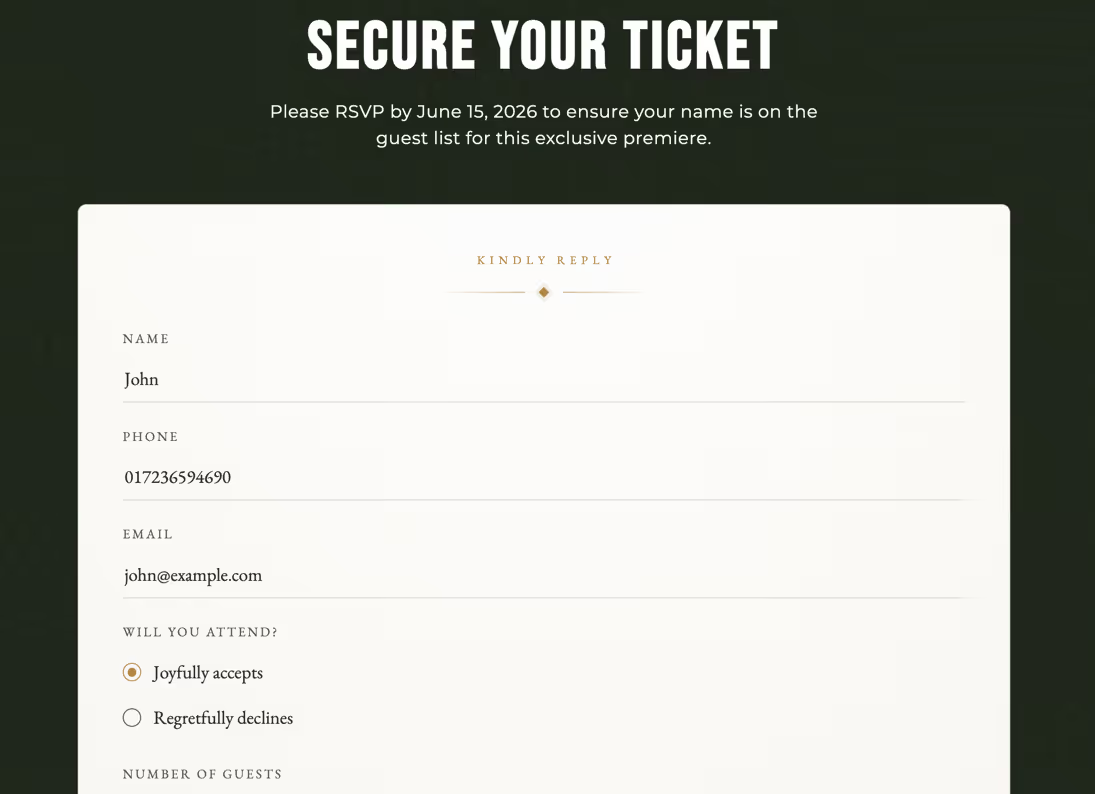 The RSVP form on one of our sample sites. The guest details are made up.
It doesn't know who hasn't replied, because it only sees the people who answered. Keep your invite list next to it for Step 5. We build the site for you, in English, Bahasa Melayu or Chinese.
Getting married soon? WhatsApp us with your date.
