I can’t remember the last time I was excited about a smartphone. Over the years, the thrill of upgrading your smartphone has been lost. Better cameras, a faster processor, some shiny new colours – same old, same old. But for the first time in years with the iPhone Duo in hand, I’ve felt like a kid with a new toy, and it seems I’m not alone.
Last Friday, Apple launched the iPhone Duo, the tech giant’s first-ever foldable phone, and it was almost as if I’d been transported back to 2007, with queues stretching down the road as fans tried to get their hands on the handset. It even sold out within minutes of pre-orders going live – if you purchase one now, it won’t arrive until January next year.
The hype has been unreal, but is it deserved? Well, dear reader, for five days, I’ve documented just about everything I’ve done with the iPhone Duo to answer that very question. Would its right-focused design be a pain to use as a leftie? Would I find it too heavy and cumbersome and go back to my tried-and-true slab phone? Would it permanently alter the course of my life? Here’s how it’s all unfolded.
Read more: The best iPhone 18 Pro deals in the UK

Read more: iPhone 18 Pro, reviewed
iPhone Duo
Why we love it
- Split view multitasking has changed how I use my phone
- The matte inner display makes watching content a joy
- Really good battery life, even with heavy multitasking
- Creative apps make the most of the folding design
- Lightweight and comfortable for a folding phone
- Excellent build quality
Take note
- Lots of apps still need optimising for the larger display
- No dedicated telephoto camera
- Can be hard to use one-handed
- Expensive
iPhone Duo: Love at first fold?
Light. That is literally the first word I think of when I slide it out of its pristine-white box. Everyone’s been rabbiting on about how heavy and thick the Duo is, but it’s really not that heavy at first touch. As a Pro Max user, it’s only 5g heavier than the 18 Pro Max (249g versus the Duo’s 254g), and I’ve not felt that weightiness at all.

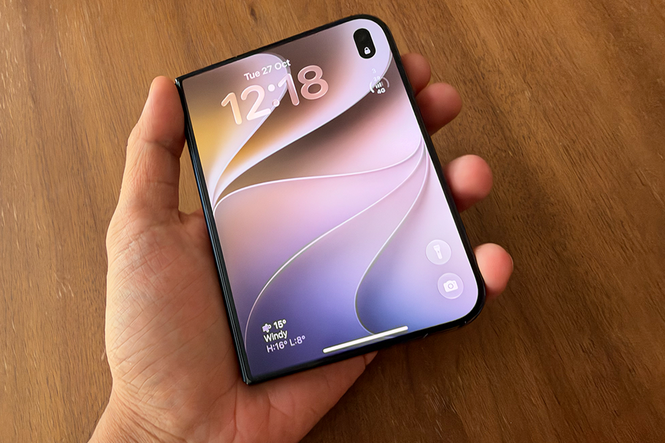
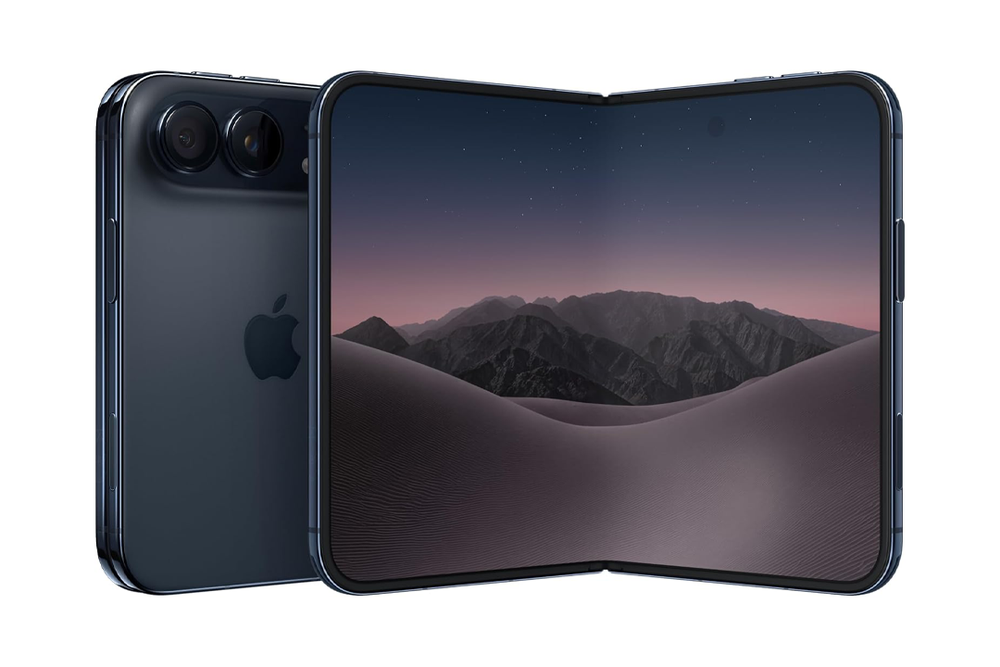
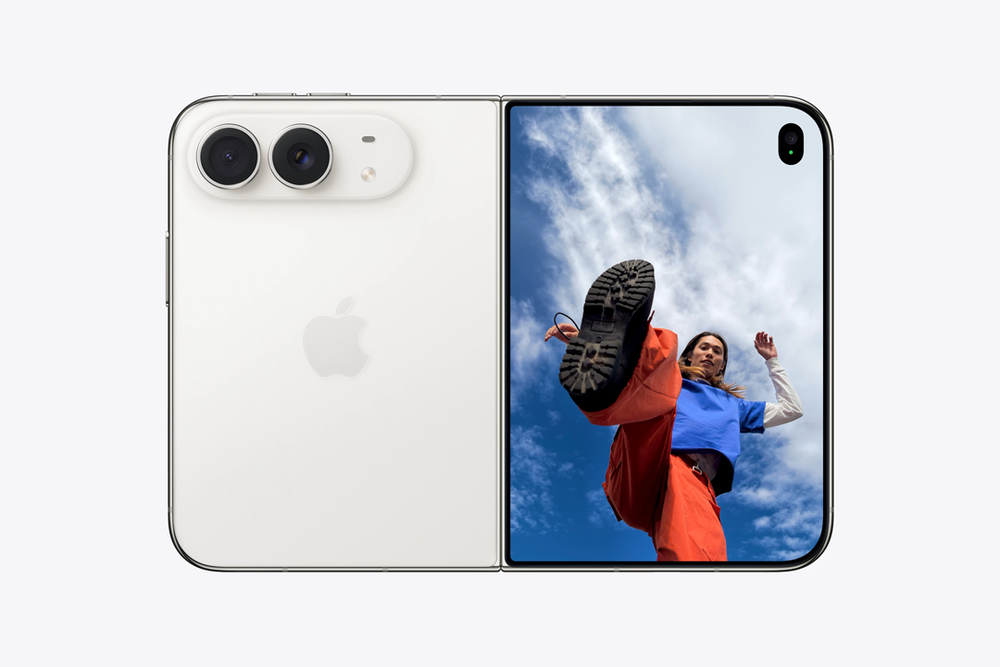
Admittedly, I wasn’t a massive fan of the iPhone Duo’s odd D-shaped design when I first saw it on a computer screen, but holding it in my hand, feeling its mirror-polished titanium frame, curved edges and solid construction – oh Apple, this thing just oozes luxury. It comes in either white or black, and I’ve got the black version.
It genuinely feels like the most expensive iPhone ever made. Even unfolding it feels satisfying – there’s a spring-like push that separates the 5.4in outer screen from the 7.6in folding inner display whenever you unfold it, then it comes together again with a pleasing snap thanks to some magnets that keep it together.
Look, Apple hasn’t changed the world – folding phones have been around now for years and years, but the iPhone Duo is as Apple of a product as they come – the build quality is just fantastic.
It feels a bit like magic when opening it up – seeing it react as you unfold it is just incredible. I’ve used plenty of folding phones, and the way the home screen dissolves into view on the left-hand side as you open it up is like nothing I’ve seen before. The way content on the left side just snaps into place when open fully is sumptuous. The implementation is so silky smooth.
Unfold the iPhone Duo and you get a glorious near-8in display. Apple says it’s paper-like, which I think is a bit of a stretch, but the matte nano-texture really does reduce glare from the sun. The presumption is that the colours will be washed out when opened, but as of day one with the iPhone Duo, it’s looked very vibrant, and the crease is practically invisible.

Personally, I’ve never been one to worry a whole deal about a folding phone’s crease (breaking news: a folding phone is going to have a crease), but this is a £2,000 phone, so it is understandable people want it to look perfect. Thankfully, that matte display does wonders for hiding the crease. You can barely tell it’s there, even if you can definitely feel it under your fingertips. It feels like a little ridge, or a well in the middle of the screen. It’s strange to touch.
As with all iPhones, it’s a doddle to set up if you have a current iPhone – you can just transfer everything over. A doddle to restore from an iCloud backup, a doddle to transfer my Apple Pay cards over and a doddle to make everything look the way it does on your old iPhone.
And while, being a leftie, I thought it’d be a nightmare to hold in my hand, I’m surprised that after a couple of hours of use, it hasn’t been awful. Yes, it feels like it’s been built for right-handed people. The curved edge is on the right, so you don’t poke your hand with the sharp edges.
Is this a phone that left-handed people can actually use? Holding it in my left hand, I’m noticing that the sharper bottom corner sits so far down my palm that it never actually digs into my hand.
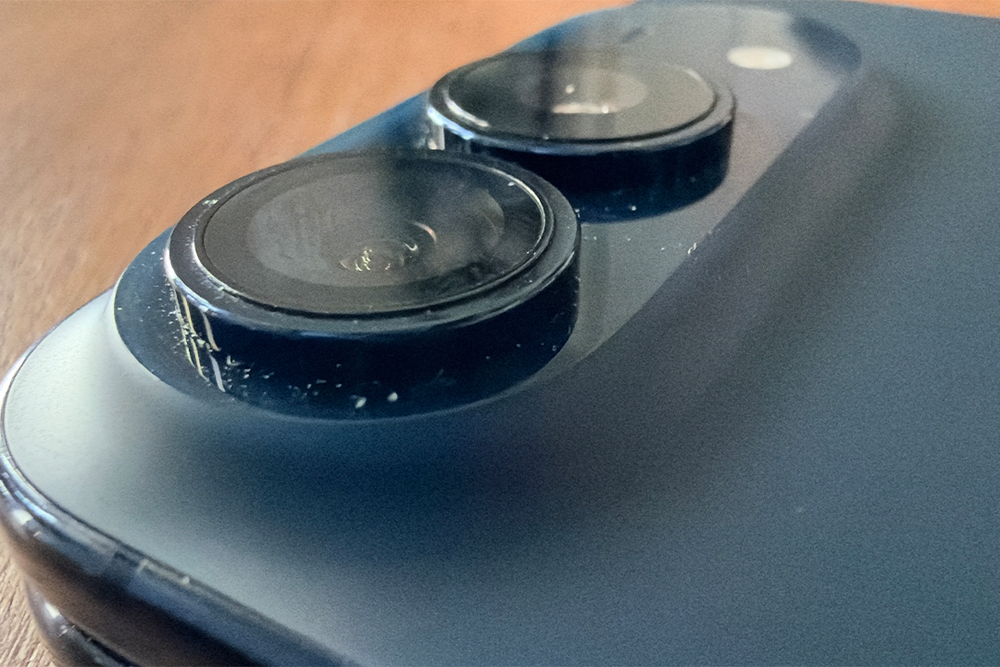
The camera plateau on the rear almost acts as a nice little shelf for your finger to help you hold it in place. It doesn’t even need to rest on your palm if you put your index finger just underneath the plateau. Another thing I’ve noticed is that because I’m a Pro Max user, I’m already used to using my phone with two hands, making it even less of an issue.
Apple has also moved the volume buttons to the top of the phone, with the side button and the camera button remaining on the right. Whether this will be confusing for my habitually fixed fingers, we’ll have to see.
But the thing that might take the most getting used to is the return to Touch ID. The iPhone Duo sees Apple ditch Face ID for the old biometric technology, putting the fingerprint sensor in the side button.
And already after day one, I’ve had to register several fingers for Touch ID. One thing I’ve noticed is there’s no right way to hold this thing – I’ve held it with one hand, two hands, left hand, right hand – you name it. I’ve primarily been using it with my left hand and unlocking it with my index finger wrapped round to touch the back.
Occasionally I hold it in my right hand and unlock it using my right thumb, and often I’ve found myself using both hands and unlocking it with my right index finger. Sometimes I even like to unlock it with my middle finger. There’s no rhyme or reason as to which finger feels most comfortable – it completely depends on how I’m gripping the phone.
And right now, I have no single way of holding it. That might become an issue because you can only register a maximum of five fingerprints. You can use an Apple Watch to unlock the Duo automatically, but I’m not an Apple Watch wearer.
But once I’ve got to grips with it all, I drum up the courage to take it outside. It’s a phone after all, for communicating on the go. Except, I’m petrified that someone’s about to nick my sold-out £2,000 phone on the streets of London, so I grip it as tightly as I can as I get on the bus, nervously eyeing everyone up.
That all changes when I get into the gym, waving around my iPhone Duo. Look what I’ve got! “Apple’s built a folding iPhone?!” my friend proclaims.
A self-confessed ‘Android girlie’, she’s hardly Apple’s target audience. But would she buy one? I ask as I flip the thing open to show off its tricks. “I’ve never been an Apple person, but this I like,” she says. “It’s so cute.”
Then we take a selfie. Because what better way to test out the iPhone Duo’s cameras than with someone who’s just declared herself an Apple convert? One of the Duo’s party tricks is that you can unfold it, flip it around and use the cover display as a viewfinder to take selfies with the dual rear cameras.

The 12MP selfie camera on the cover screen is fine, but I can see why Apple recommends taking selfies using the rear cameras – two 48MP sensors (which I’ll test over the coming days). The rear-camera shot is a lot sharper, capturing way more detail in our hair and faces. The regular selfie looks a little grainy in comparison.
I later discover that taking a picture with the front-facing camera on the inner display is even worse, with a low-res 4MP snapper that’s only really good enough for a quick little FaceTime. I can see why you’d probably only ever want to take selfies using the rear camera system.
iPhone Duo: When it all clicks
It’s a new day, it’s a new dawn, it’s a new life… with my iPhone Duo, and the first thing I do when I wake up is catch up on The Traitors. Except, now I’ve got this big screen, I don’t need to whip out my iPad anymore, I can just watch it by unfolding my phone.
The first ‘this is starting to click’ moment comes halfway through the episode, when I realise I need to update my smartwatch. Ordinarily, I’d have been stuck staring at a progress bar for what could be an hour, being told to keep the app open while I waited and waited and waited. Then I remember the iPhone Duo has Split View. I drag BBC iPlayer to the right, Google Health to the left and continue watching my show while my smartwatch updates. Gamechanger.
Over the course of the day, I start doing this with multiple apps. Netflix on the left, Reddit on the right. Twitter on the right, Safari on the left. I watch a lot of things in picture-in-picture on my regular iPhone, but being able to watch something on one side of the screen while browsing the web on the other is a whole new experience. Right now, I’m using split view way more than I ever thought I would.
And the screen itself? Well, it’s gorgeous. The biggest difference I’ve noticed after spending more time with it is how much easier it is to watch things when there’s sunlight streaming through the window. I sometimes struggle to watch stuff on my 11th-gen iPad, just when I’m sitting in bed. Reflections aren’t the common-or-garden iPad’s friend, but glare can barely touch the iPhone Duo.
That doesn’t mean it’s immune to sunlight. Sitting outside with the sun shining onto the screen directly was still a struggle. But otherwise, I was able to watch all my shows without issue. The speakers are fantastic, too. I hated how the Samsung Galaxy Z Fold 8’s speakers were only on one side of the phone (especially in tablet mode), but the iPhone Duo’s speakers are on both the top and bottom, so it feels more balanced and immersive. They can even play audio independent of each other.
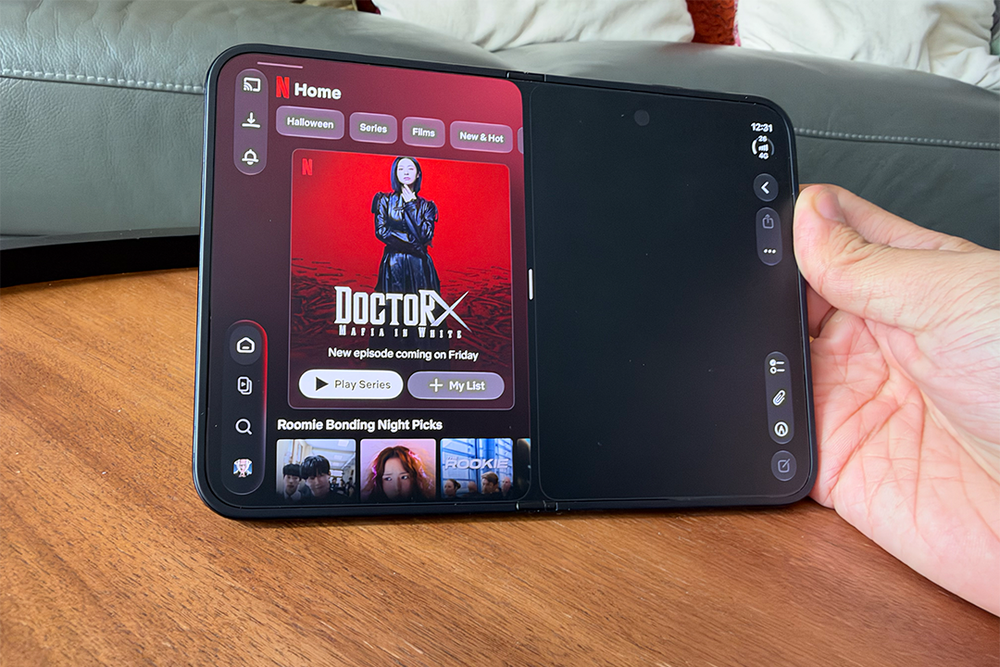
It’s not just content that’s better. There’s so much productivity use cases here. The keyboard is super easy to type on with two thumbs, and I’ve been opening up my phone and placing it into tablet mode so frequently. Want to edit PDFs? Open it up and rotate it into portrait mode. Reading ebooks? Open it up and swipe through pages like you’re reading an actual book on a big screen with one page on either side.
Of course, all of this depends on the apps actually making use of that lovely big screen, and there are still a lot of issues with app optimisation – an issue that could be with us for months.
All my banking apps, for example, are marooned in the middle of the display when I open them in tablet mode, surrounded by wasted space. TikTok, Reddit, Amazon, even YouTube – not optimised. Some of these will be updated eventually, but I know some apps (like the app I use for my gym) hasn’t been updated in years and likely won’t ever be updated again.
Trying to watch shows on the Channel 4 app left gigantic black borders around the image. Pinch to zoom didn’t work, but you could press the expand button at the bottom right. ITVX was better optimised when watching content, but the app was still marooned in the middle when scrolling through it in landscape.
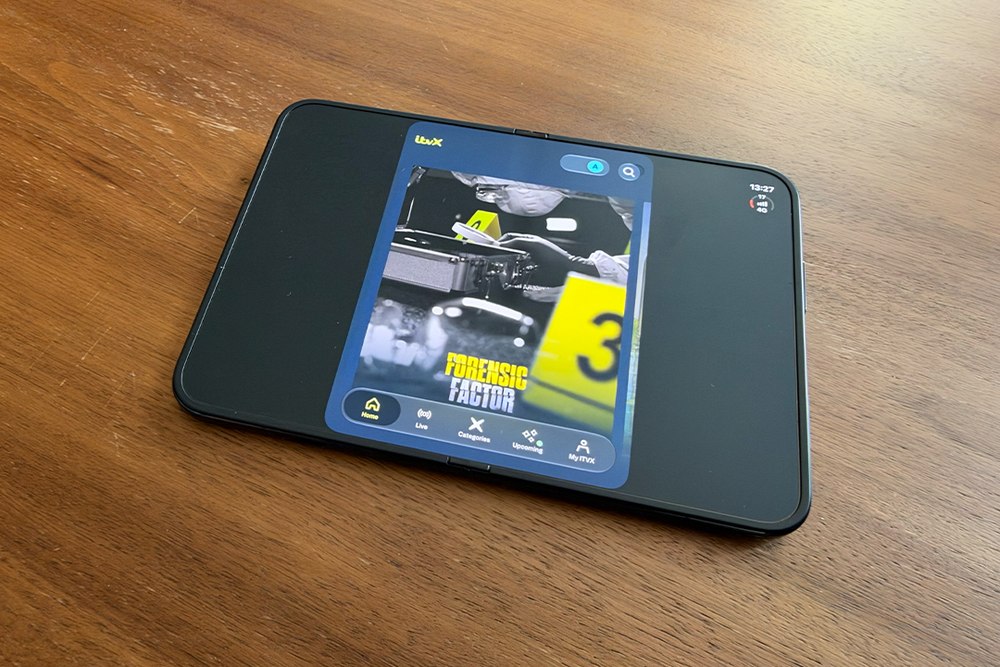
Even apps that have been optimised for the iPhone Duo haven’t been fully thought out. On Instagram, for example, the like and share buttons are still placed on top of the Reel itself even though we’ve now got that bar on the side.
When apps are optimised, it’s so much fun to use. Safari, Mail and Photos, make such good use of the extra screen real estate in tablet mode.
Some third-party developers have done a brilliant job as well. Slack, for example, has been optimised so it shows channels and conversations together, almost like the desktop version. In Netflix, the transition from the smaller outer display to the big screen is completely seamless. The best apps are making use of the extra space instead of just stretching content, or making the app bigger.
Speaking of which – the dock and UI elements have all been moved to the right-hand side of the screen. and right now, I’m still instinctively reaching for the bottom whenever I want to switch apps. It’s going to take a lot of finger rewiring.
The back button has been a real headache to get used to, especially because on unoptimized apps, the back button is still at the top left, but on optimised apps, it’s now in the sidebar. You can always swipe to go back, but try telling that to my muscle memory. It’s also odd not being able to tap the Dynamic Island to scroll back to the top of the screen.
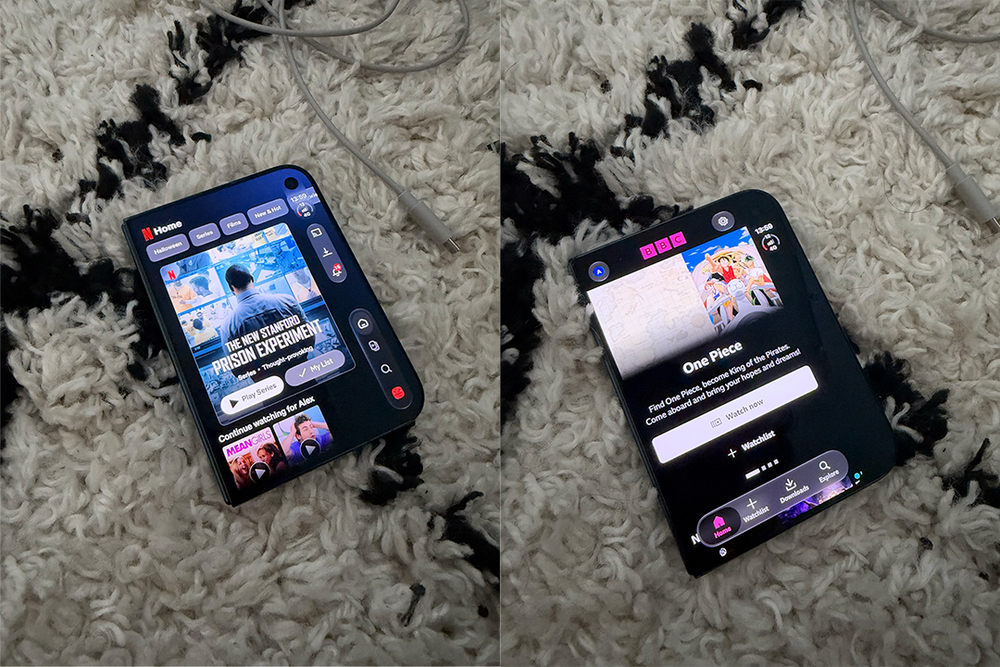
I hope Apple eventually makes the dock moveable. When I’m using split view, the dock sometimes shifts to the left, giving me a tantalising glimpse of how the other half live with the dock sitting under my dominant hand, but I’m starting to get used to the positioning.
iPhone Duo: Picture imperfect?
And then there are the cameras – the biggest downgrade from an iPhone 18 Pro Max. A folding phone is never going to have as good cameras as a slab phone – I’ve realised that from all the years testing foldables from Android manufacturers, but I’ve actually been impressed by the iPhone Duo’s camera system.
The iPhone Duo has two 48MP cameras on the rear – a main and an ultrawide. Pictures I’ve taken on the main camera have been really nice. There’s detail in my shots and colours look good. Night pictures do need some assistance from night mode to look good, with some slight colour loss, but there’s not much streetlight flaring. It doesn’t feel like I’ve downgraded to an inferior product.
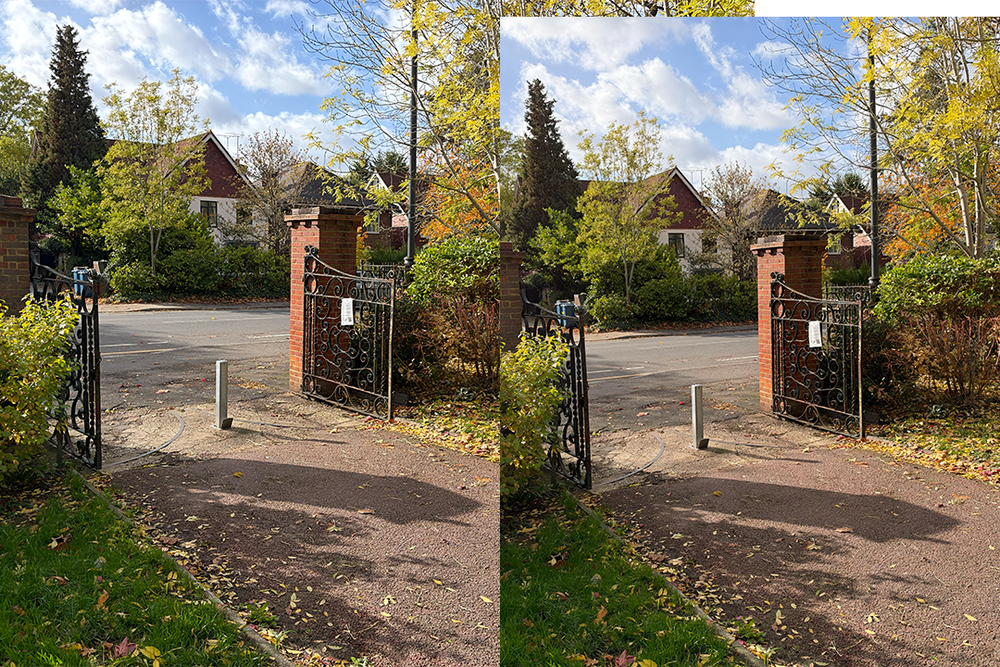
It’s only when I start zooming in that I miss my Pro Max. There’s no dedicated telephoto lens on the Duo, so while I can get a good 2x shot, I can’t zoom in to pictures of my dog in the park and he’s far away. Admittedly, there aren’t many instances when I use the telephoto, but there are always instances when it’s handy.
I have bumped into another leftie issue when taking pictures, however. Everything being on the right makes it quite difficult to reach with my left hand, especially when taking photos in tablet mode. But why would I want to take pictures in tablet mode anyway? Well, I don’t really. It gives me flashbacks to those days when – shivers – people would take mirror selfies holding up an entire iPad.
There are some reasons why you’d want to. The first is, of course, to take selfies with the higher-quality rear lens, using the outer screen as a viewfinder. It still feels a little unnatural to me, but I’m sure I’ll get used to it. Smart Take is a nice camera feature as well, waiting until everyone’s ready before it automatically snaps a pic (no rushing into frame after setting a timer).
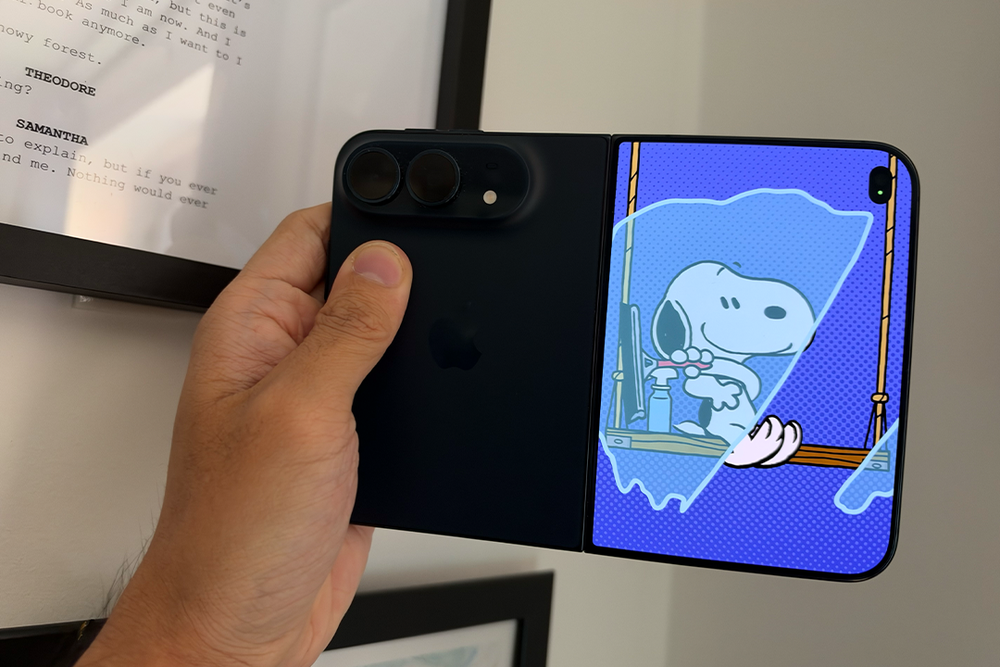
Then there’s Kid Cue, which displays cute little Snoopy animations on the outer screen to encourage children to look at the camera. It’s such a lovely, lovely touch.
Except, would I really want to unfold my phone every time I wanted to take a selfie or a picture of my nephew? I’m leaning towards no. The thing I noticed most is that I don’t massively like taking pictures in tablet mode and having to hold it with two hands to do so.
The other odd thing is how the rear camera is oriented in tablet mode. I have to hold the phone in landscape to take portrait pictures and vertically to take landscape pictures because of how the sensors are positioned. It’s a little confusing.
The ‘D’ shape does make it easier to remember which way round you’re supposed to hold the phone, however.
iPhone Duo: Habit-forming
It’s a lazy Sunday, and I’m starting to realise that watching YouTube on the iPhone Duo isn’t the same as watching it on a regular phone. I’m lying in bed, holding it in tablet mode above my face, and my arm is getting tired. It’s not so much the weight itself – it’s how that weight feels when I’m holding a big, unfolded screen above my head. And I just know it’s going to hurt when I inevitably drop the thing on my face.
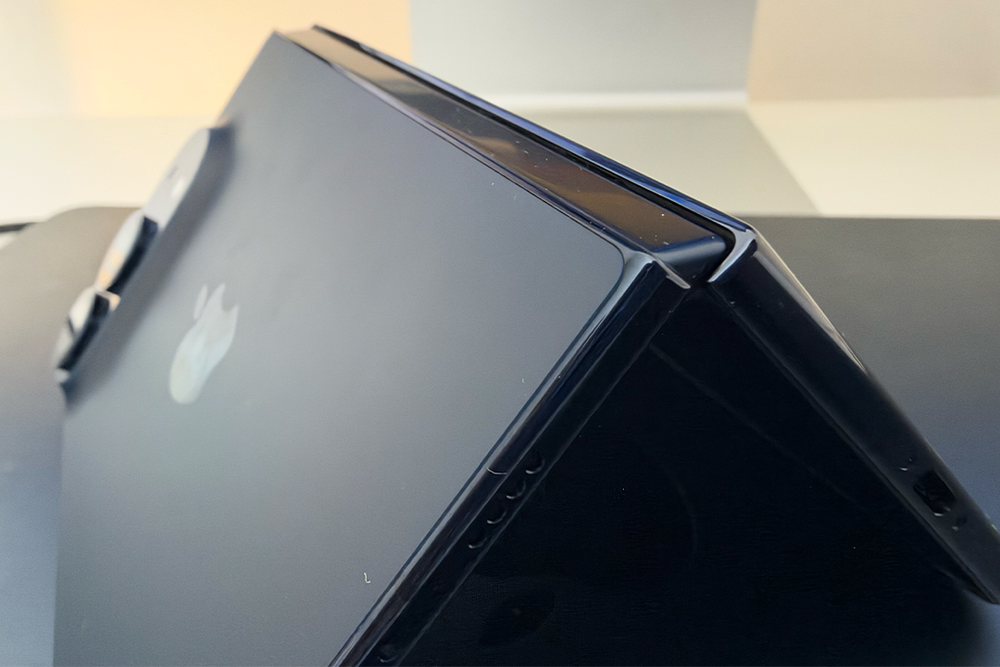
Eventually, I give up and put it into “tent mode”, where you fold it very slightly with the inner screen face down. I rest it on my chest. It’s the first time I’ve used the iPhone Duo in a position that isn’t fully open or fully closed. You couldn’t do that with a phone that didn’t bend in the middle.
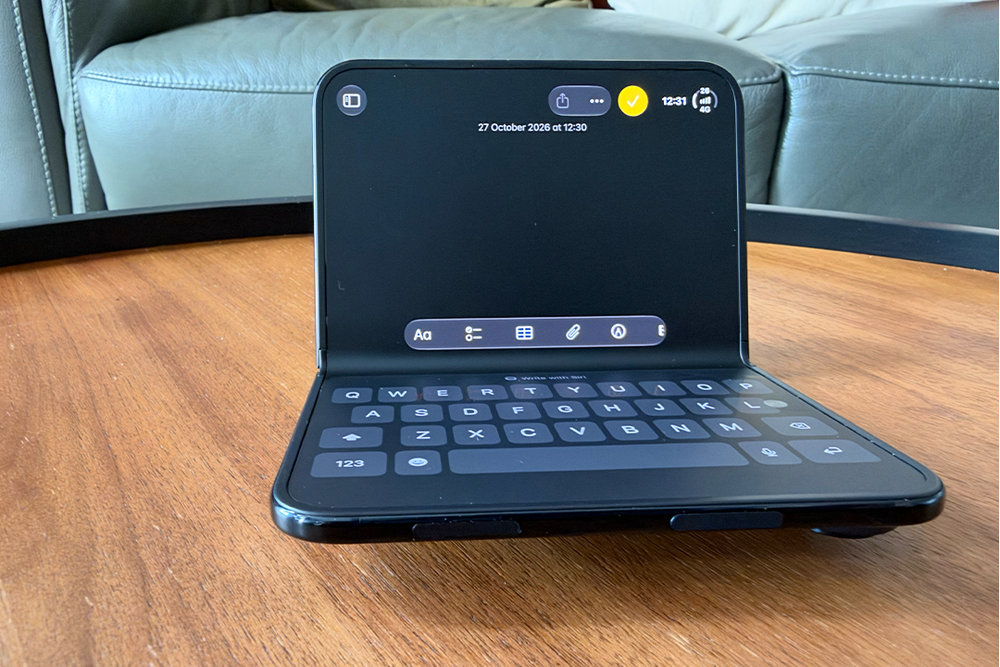
There are also quirks, however – you can’t rotate the screen when it’s in phone mode, it just stays in the same position, though you can coax content to flip into landscape mode on the outer screen by doing some hocus pocus (aka opening it up, rotating the phone, then closing it again).
There are so many different ways to use this thing – folded, unfolded, propped up in tent mode, partially open like a miniature laptop, folded very slightly and propped up on a table to push it into standby mode – but I’m definitely using it in more ways than others.
If I had to put a number on it, I’d say I use the iPhone Duo folded about 55 per cent of the time and unfolded around 45 per cent. Tent mode gets the occasional outing, but standby mode and laptop mode? Almost never.
Five days later, opening the iPhone Duo with one hand is still really difficult, and I’m still trying to find the perfect position to hold it one-handed. Because it’s wider than a regular iPhone, stretching my thumb across the screen can be a bit of a struggle, whether I’m holding it in my left or right. I’m also still accidentally pressing the side button when I mean to turn the volume up or down . Old habits die hard.
The hinge itself, however, still feels just as sturdy as it did when I first took the iPhone Duo out of the box. It’s not loose, there’s no wobble. It’s strong as a rock, though five days isn’t quite long enough to determine whether it’ll sustain that strength after a year.
As to how I’m using it? I use the iPhone Duo folded for most regular phone tasks. I reply to texts with it closed, I scroll through social media with it closed, I check my emails with it closed. But I’m unfolding it a lot more often than I ever thought I would.
That’s largely because I watch an obscene amount of TV and YouTube – genuinely, I’m addicted. My iPad has barely had a look-in since I started using the Duo. I watch films in split view so I can search things up about the plot or the actors, then switch to Twitter when I get bored to read live reactions, all while continuing to watch in split view.
It does take some thought, though. Do I unfold the iPhone Duo and enjoy the bigger screen, even if it’s a little more unwieldy to hold? Or do I keep it folded and watch something in picture-in-picture while scrolling through something else?
The amazing thing is that despite maxing out my iPhone Duo with split view apps, performance has never been sluggish. It uses the same A20 Pro chip as the iPhone 18 Pro, so it’s just as speedy.
The iPhone Duo does get a little warmer than my iPhone 18 Pro Max, which has me wondering whether Apple's decision to use titanium instead of aluminium has something to do with it. Titanium isn't as good at conducting heat, but the Duo's folding design and thinner vapour chamber could also be a contributing factor.
Battery life, however, is absolutely fantastic. I’m getting a full day’s use from a single charge, and I’m a heavy user. I don’t need to recharge the thing until the evening. Anecdotally, It’s very near to the battery life on my iPhone 18 Pro Max, and I’m still watching hours of YouTube, constantly using split view. I haven’t exactly been going easy on the battery life.
iPhone Duo: Making phones fun again
More than anything, though, it’s the stupid little novelty apps that have made me fall in love with the iPhone Duo. They’re just fun, something I’ve been really missing from phones.
I’m transported back to the early days of the App Store, when I’d spend hours downloading pointless novelty apps onto my iPod Touch, making it fart, pretending to down a pint of beer, popping virtual bubble wrap and waving my device around like a lightsaber. Long live iBeer, BubbleWrap, iFart and Lightsaber Unleashed.
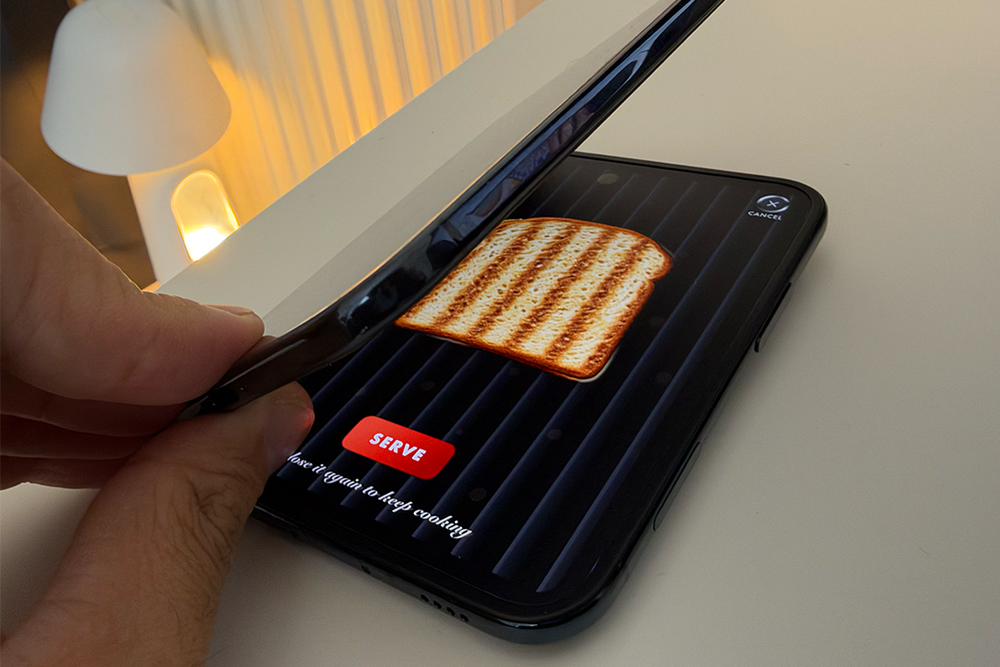
Third-party developers have brought all that novelty back. Toastie turns my £2,000 phone into virtual cheese toastie maker. Assemble the sandwich, fold the phone shut to cook it, then peek inside to see if it’s cooked or you’re on the verge of burning it to a crisp.
Deck-Man turned my iPhone Duo into a tiny cassette player, letting me pick an album, load a virtual cassette into the deck and snap the phone shut to start playing music, with satisfying whirs of a classic Walkman.
Tiny Computers is like a museum of classic computers. You fold the iPhone Duo into laptop mode and it becomes a miniature retro computer with the screen on the top half and the keyboard on the bottom.
I even risked opening the iPhone Duo into tablet mode on the tube to use an app called Actually Read, which places the cover of the book you’re reading on the outer display in so-called “performative mode”, so everyone can see how sophisticated you are when you’re reading Pride and Prejudice.
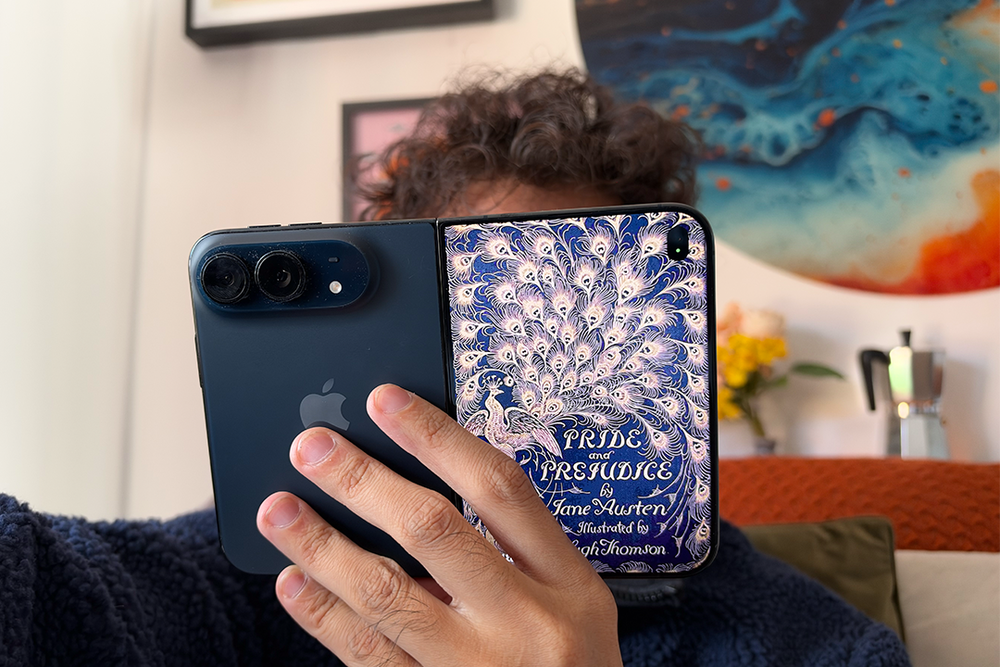
Do I need any of these apps in my life? Probably not. Is it a whole load of fun? You bet it is. For the first time in forever, devs are experimenting with the format of the iPhone Duo, letting you do silly little things that make a phone fun and novel. I haven’t had this much fun with an iPhone since I got my first iPod touch. And that’s something I never thought I’d say again.
Key specifications
Buy now £1999, Carphonewarehouse.com
Best iPhone Duo deals
iPhone Duo with 100GB of data: £85.99 per month, £129.99 up-front, Carphonewarehouse.com
The best deal I’ve spotted on the iPhone Duo is at Carphone Warehouse. It comes with 100GB of data on a 24-month iD Mobile contract. You’ll pay £129 upfront, plus £85.99 per month. That works out to £2,192.76 over 24 months before the scheduled price rises. That’s £193.76 more than buying the iPhone Duo outright, meaning you’re essentially paying just £8.07 per month for 100GB of data. Carphone Warehouse also has delivery available for 24 November, so you won’t be waiting until next year to get your hands on the iPhone Duo.
Should you buy the iPhone Duo?
Sorry Apple, but I think you might have made me more addicted to my phone than ever before. Five days ago, I used to put my phone away when I wanted to watch something on BBC iPlayer or Netflix. Now, I don’t use my iPad or turn on the TV, I just unfold my phone and watch it… on the same phone in tablet mode. The novelty hasn’t worn off either. If anything, I get a little shiver of excitement every time I remember that I’ve got an iPad-sized screen in my hand.
Yes, there are things missing, and a huge number of apps still need to be optimised – and I mean a lot. I miss the telephoto camera on my iPhone 18 Pro Max and some of the ergonomics take getting used to, especially as a leftie. But that’s to be expected from any new form factor. At £1,999, it’s a lot to splash out on a smartphone.
But would I go back to my iPhone 18 Pro Max? Right now, I really don’t want to. The brilliant folding display, the excellent battery life and, most of all, the sheer versatility of having a phone and a tablet in one single device just can’t be overstated. I’m folding it and unfolding it so often – not because I can, but because I’m finding a need to.
Apple hasn’t invented folding phones. Android manufacturers have been making them for years. But the iPhone Duo has reminded me that I can still get excited about a smartphone. That phones can still be fun.
How I tested the iPhone Duo
I’ve spent five days using the iPhone Duo as my main phone. I’ve taken it everywhere with me, from the gym to the London Underground. I’ve tested to see how comfortable it is to use folded and unfolded (and yes, as a leftie).
I’ve watched hours of Netflix, BBC iPlayer and YouTube, tested Split View multitasking, tried out apps designed specifically for the folding display and compared its cameras with those on my regular iPhone.
I’ve also tested the battery life in daily use, taken photos in daylight and at night, and assessed the hinge, display and build quality.
Why you can trust IndyBest reviews
Alex Lee is IndyBest's tech editor. He's been reviewing smartphones, tablets and consumer technology for a decade and has put hundreds of devices through real-world testing from fitness trackers to headphones. Every product is used as part of his everyday routine and judged on how it performs in daily life, helping readers find the gadgets that are worth buying.