If you're after a VPN with serious privacy chops, Proton VPN might be the best VPN for you. Built by the same team behind Proton Mail (the encrypted email service used by journalists, activists and your most paranoid pal), the company has the receipts to back up its reputation.
While NordVPN still leads the pack overall, and Surfshark is dirt-cheap, Proton VPN is the one I’d recommend to anyone who actually cares about their data. Proton VPN’s whole mission is transparency, with open-source apps, regular independent audits and a strict no-logs policy, but it’s also become a much better VPN since I first reviewed it in 2021.
Proton VPN boasts more than 20,000 servers in more than 140 countries and still has one of the most generous free plans out of the providers I’ve tested. It’s also got noticeably faster and its previously pretty rubbish NetShield ad blocker is massively improved.
It’s still slightly rough around the edges, and I was disappointed to see Proton adopt introductory pricing that gets more expensive when it renews. I’ve gone back and retested Proton VPN across all my devices to see how much has changed and whether it’s still worth subscribing to in 2026.
Read more: Best VPNs, reviewed
Proton VPN
Pros
Cons
Proton VPN pricing
Proton VPN isn’t the cheapest VPN out there, but nor is it trying to be. It’s more expensive than Surfshark, about on par with NordVPN and cheaper than ExpressVPN. While it doesn’t offer cyber insurance like Nord’s Ultimate plan, you get plenty of privacy tools, bundled encrypted cloud storage and even a password manager.
Unlike most VPNs, Proton isn’t just selling you a VPN; it’s selling a whole privacy ecosystem. The Free and Unlimited tiers are full security suites, bundling in extras like Proton Mail, Proton Drive and Proton Pass (its password manager), while VPN Plus is the core VPN product. However, even the VPN-only plan comes with access to Proton’s free tools. There’s also a 30-day money-back guarantee if you change your mind.
One thing I was a bit disappointed to see, though, is that Proton has changed its approach to renewal pricing since my original review. Previously, the price you signed up for was the price you’d keep paying, which was one of the things I really liked about Proton. That’s no longer the case.
The two-year VPN Plus deal costs £66.96 up front, which is equivalent to £2.79 per month, but it now renews at £67.08 every 12 months. That means you’re effectively paying twice as much per year once the introductory deal ends. Proton Unlimited does the same, increasing from £153.36 for the first two years to £95.88 per year when it renews. It’s a shame to see Proton adopt the same kind of introductory pricing model I’ve criticised other VPN providers for using.
Proton Free costs nothing and gives you unlimited data, no ads and access to servers in 10 countries on one device. You can’t freely choose which free server you connect to, however, and you miss out on streaming, torrenting, NetShield and Secure Core.
Proton VPN Plus is the main paid plan and unlocks all the good stuff. It includes full-speed servers in more than 140 countries, streaming, Secure Core, NetShield, split tunnelling and torrenting on up to 10 devices. The cheapest deal costs £66.96 for the first two years, equivalent to £2.79 per month, before renewing at £67.08 per year.
Proton Unlimited includes everything in VPN Plus alongside the premium versions of Proton’s other privacy tools, including Proton Mail, Proton Drive with 500GB of storage and Proton Pass. It costs £153.36 for the first two years, equivalent to £6.39 per month, before renewing at £95.88 per year.
Proton VPN privacy and features
If privacy is your main reason for using a VPN, Proton VPN is one of the most trustworthy services out there.
Everything’s open source, independently audited and based in Switzerland, which means it’s outside the reach of data-hungry intelligence alliances like Five Eyes. The no-logs policy is really clear. In fairness, I didn’t dig through the open-source code myself, but knowing it’s all public gave me confidence.
You get strong encryption and access to trusted tunnelling protocols, including WireGuard and Proton’s own Stealth protocol. Proton has also started rolling out Proton Protocols, a new WireGuard-based architecture designed to improve speed, reliability and censorship resistance, while laying the groundwork for features such as post-quantum encryption.
WireGuard is the default I went with during my testing, and it worked fabulously. It was consistently fast and stable, even on patchy wifi on the tube. The Stealth protocol helps you get around VPN blocks or censorship, disguising VPN traffic to make it harder to detect. Proton VPN also uses Smart Protocol, a feature that automatically selects the best tunnelling method if another connection is blocked.
There’s a kill switch baked in, too, but it’s not enabled by default. I had to manually switch it on in the app. Proton VPN’s Always-on VPN feature is switched on by default, so the moment your phone or laptop reconnects to wifi or data, it’ll automatically tunnel back through the VPN. While it’s a great backup, the kill switch is still worth activating for the extra peace of mind.
Secure Core is one of Proton VPN’s standout features. It routes your traffic through an extra Proton-owned server before connecting to the internet. It’s not the fastest. I noticed a slight slowdown when I used it over public wifi, but it’s nice having the added layer of protection.
When I last tested NetShield – Proton’s ad and malware blocker – in 2025, it was pretty rubbish. While it could block malware, ads and trackers, I found that I still got loads of ads, and it was nowhere near as effective as a dedicated ad blocker like AdGuard.
That’s changed a lot since then. In February 2026, Proton upgraded NetShield to block individual subdomains rather than just entire domains, which it claims makes it six times more effective at blocking ads and trackers. Having tested it again, the difference is night and day. It blocks a huge amount of ads compared to before and I actually can’t live without it. Before it was just something I’d leave switched on without really noticing it was even on.
There’s also split tunnelling on Android and Windows, which worked perfectly when I excluded my banking app. Traffic was routed correctly, and Proton has since added experimental split tunnelling to macOS, letting Mac users exclude individual apps from the VPN tunnel too. It’s still missing on iOS, however.
Proton VPN also supports torrenting via dedicated P2P servers, and port forwarding is available on Windows, macOS and Linux. There’s even Tor over VPN support, letting you route your traffic through the Tor network without having to use the Tor Browser.
You can also create custom connection profiles. I set one up for general streaming, another with Secure Core and a third using the stealth protocol for testing in restricted networks. It saves reconfiguring everything each time. You can also set the VPN to auto-connect on launch or when connected to unsecured wifi.
All of this is paired with Perfect Forward Secrecy, so even if someone did manage to snatch your encryption keys, they’d only get access to that one session, not any previous or future ones. There’s some really advanced stuff here, especially for Windows users.
Proton VPN logging
Proton VPN is based in Switzerland, which has some of the world’s strongest privacy laws. That means it’s not part of any surveillance alliances like Five Eyes, and the Swiss government can’t demand your data without jumping through serious legal hoops. Even then, there’s not much Proton could hand over. It has a strict no-logs policy. It doesn’t track your browsing habits, record your IP address or identify what you were doing online.
Proton’s also proved it in court. In 2019, Swiss authorities issued an order asking Proton to start logging a specific user. But because of how Proton VPN is built, it physically couldn’t. The authorities were told this, and the case was closed without any data being turned over. It’s a rare real-world example of a no-logs policy actually being tested.
Proton VPN has now passed five consecutive annual no-logs audits, with its latest independent audit carried out by European security firm Securitum and published in June 2026. The audit examined Proton VPN’s server configurations, operating procedures and technical controls, and found its no-logs claims to be accurate.
On top of that, Proton makes all its apps open source, runs a public bug bounty program and releases a yearly transparency report. Proton says its no-logs architecture has now also been tested through more than 400 legal cases. Few VPNs go to this level to prove their trustworthiness.
Proton VPN performance and speed
Proton VPN was already exceedingly fast when I last tested it in 2025, but it’s even faster now. Back then, on my 67Mbps broadband, Proton VPN shaved about six per cent off my download speed on a UK server and around nine per cent when connected to the US. Those were already good results, but in my latest testing, the impact on my connection was even smaller.
Speeds reached roughly 66.5Mbps on a UK server and 65Mbps on a US server – drops of less than one per cent and around three per cent respectively. The difference is basically imperceptible.
Everything loaded almost instantly, streaming was flawless and switching between UK and overseas servers barely made a noticeable difference. Proton has made some big changes under the bonnet since my original review as well, and from my testing, its performance has only got better.
There’s also a VPN Accelerator feature, which is designed to improve speeds on long-distance connections by reducing latency. It’s hard to isolate the impact during day-to-day use, but it didn’t seem to hurt. The connection was stable even when I was hopping between different countries and testing out Secure Core, which slows things down a touch. You are being routed through two servers, after all.
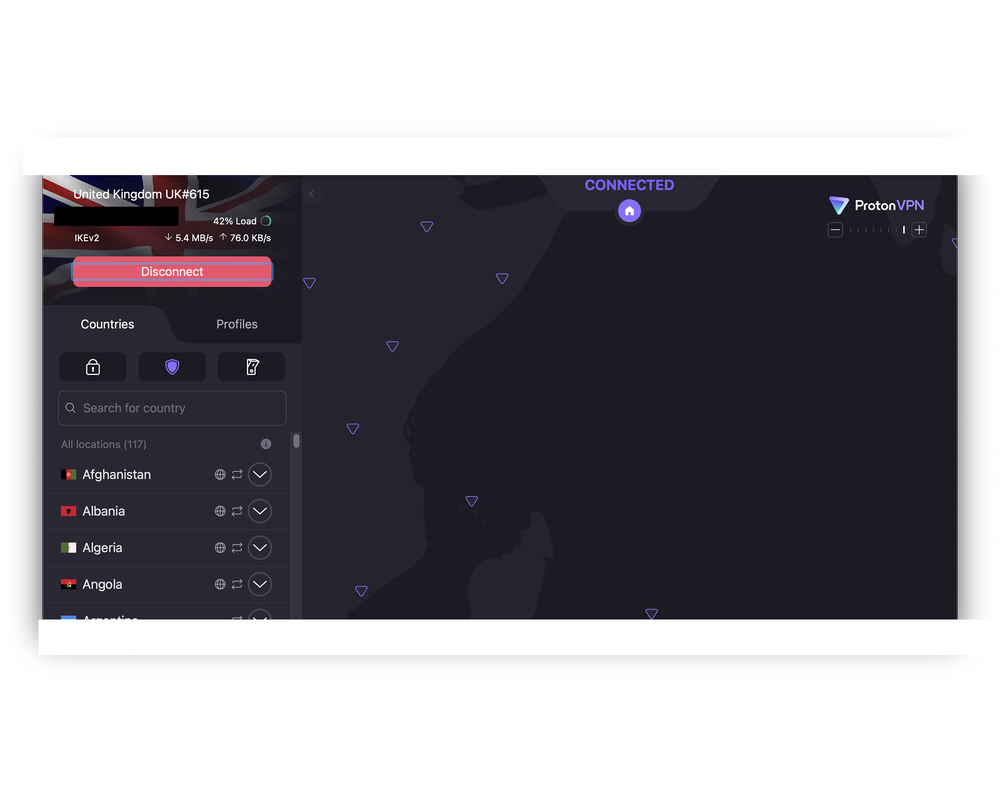
That said, the UI experience varies quite a bit between platforms. On macOS, the app is clean and easy to navigate. You get a subtle map at the top, a country list on the left and tabs for things like Secure Core, NetShield and the kill switch. Most of the more advanced settings are tucked away. It’s simple and lightweight, though probably too stripped-back for anyone looking to tweak things.
The Windows app has more features but feels cluttered. The two-panel layout has the server list, including labels for P2P and Tor, on the left, and a settings sidebar on the right where you can toggle port forwarding, switch protocols and configure the kill switch. There’s also an interactive world map in the middle. You can click on countries to connect, but it’s not all that useful in practice. It mostly feels like a visual flourish that gets in the way more than anything, especially when you just want to scroll and connect quickly. You can still monitor your real-time speed, IP address and server load from the main screen, which is handy.
Proton VPN iOS and Android apps
The Proton VPN mobile apps aren’t quite as slick or intuitive as the desktop version, and the layout varies depending on whether you’re on iOS or Android.
On iOS and Android, the Home tab shows a giant world map up top, but it’s mostly there for decoration. You can’t tap on it to choose a location, so it ends up feeling like wasted space. Below that, you have quick connect buttons for the fastest server and your most recent connection, plus a readout of how many ads and trackers have been blocked. To pick a server, you need to head into the Locations tab.
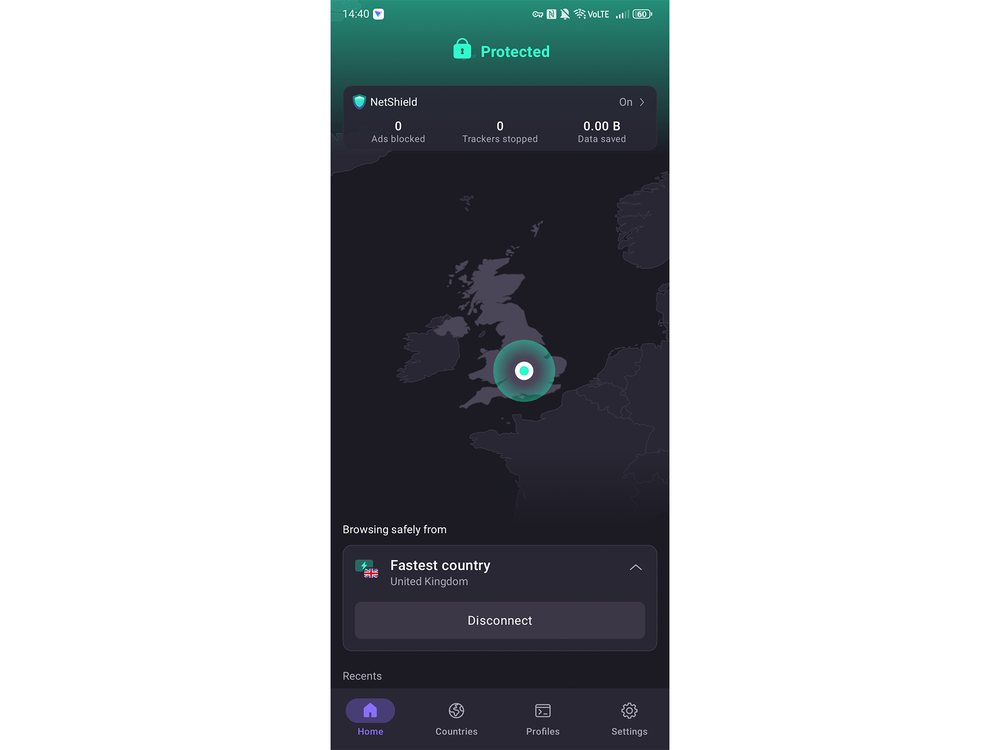
There’s also a profiles tab where you can save custom presets, which is useful if you regularly switch between different setups like Secure Core or Stealth. You’ll find settings like NetShield, the kill switch and Always-on VPN tucked into the main menu, but you don’t get features such as split tunnelling or port forwarding.
Android users also get more control: there’s split tunnelling, custom DNS settings and even a home screen widget for one-tap access.
Proton has also added support for Apple Shortcuts on iOS, so you can use Siri to connect or disconnect the VPN or build automations that trigger Proton VPN at certain times or locations.
That said, both apps require a fair bit of tab-hopping. The map looks nice, but doesn’t do anything, and all the real functionality is hidden behind secondary menus. It’s not bad, and everything’s clearly labelled, but it does take a few extra taps to get where you want to go.
Proton VPN streaming
Proton VPN might not rave about streaming support as much as its rivals, but it still works like a charm. I tested it with Netflix, BBC iPlayer, Disney+, ITVX and Sky Go, and everything played smoothly without any errors. I didn’t have to bounce around different servers or dig through support articles to find one that worked. Content like EastEnders on BBC iPlayer and The Genius Game on ITVX loaded and played without any issues.
I streamed a few episodes of The Devil’s Plan on Netflix in HD during testing and didn’t run into any buffering, even when connected to servers further afield. The connection was stable throughout. Obviously, this will also largely depend on the speed of your wifi connection – the faster your wifi, the less likely you’ll run into buffering.
Streaming isn’t available on the free plan. You’ll need to be on the Plus or Unlimited tier to get access. But if you’re already signed up, it worked perfectly for streaming all our services.
Proton VPN: Support
Proton VPN has live chat support, but only if you’re a paying user. You won’t see the chat option unless you’re logged in to a Plus or Unlimited account. To access it, I had to log in to the website and then click on Live chat at the bottom. It can only be accessed during its operating hours (9am to midnight CET), but you can also leave a message and Proton will get back to you by email.
I asked a question about the kill switch and only had to wait about 10 seconds to get connected to an agent. The person I spoke to was helpful and gave a clear answer without fobbing me off or linking to a generic support article.
If you’re using the free version, you won’t get live chat. You’re directed to submit a support ticket or dig through the help centre instead. The support docs are decent, though, and there’s a fair amount of detail once you land on the right page.
Key specifications
Buy now £2.79, Protonvpn.com
Your questions on Proton VPN answered
How does Proton VPN compare to other VPNs?
From my own testing, Proton VPN performs really well against bigger names like NordVPN and ExpressVPN. Speeds have improved considerably since my original review, with barely any impact on my connection in my latest tests, but privacy and transparency are still where Proton really stands out. It’s based in Switzerland, open-sources all its apps and has now passed five consecutive annual no-logs audits. Its free plan also sets it apart from most premium rivals, which usually lock everything behind a paywall. If you’re after a VPN that’s privacy-first, independently audited and free to use, Proton VPN is one of the best options.
Should you get Proton VPN?
Proton VPN is one of the most trustworthy and well-rounded VPNs out there. It’s not the cheapest, but you’re getting a lot more than just a VPN tunnel. The whole privacy ecosystem with Proton Mail, Drive and Pass adds real value, especially if you’re going all in with the Unlimited plan. The free version is also very useful, with unlimited data and no ads, which is rare. While the Windows app feels a bit busy, it’s packed with advanced features like port forwarding, split tunnelling and Tor support that power users will appreciate. Streaming works brilliantly too, and Proton was even faster in my latest round of testing, barely making a dent in my broadband speeds.
That said, it’s not without its quirks. The mobile apps could be slicker and iOS users are still left without split tunnelling or some of the more advanced controls. I was also disappointed to see Proton introduce higher renewal prices, which takes away one of the advantages it previously had over some of its rivals. But NetShield is massively improved, the speeds are excellent and its stance on transparency remains one of its biggest strengths. If privacy is your priority and you don’t mind doing a bit of menu-diving, Proton VPN is still one of the best services around.
How I tested Proton VPN
I retested Proton VPN in 2026 using an iPhone 15 Pro Max, a Google Pixel 11 Pro, a MacBook Pro and a Windows laptop on public wifi, home broadband and 5G. I ran fresh speed tests, streamed UK TV on UK servers, downloaded large files and tested features including Secure Core, split tunnelling and the improved NetShield ad blocker.
To get a feel for day-to-day usability, I switched between protocols, tried it while video calling and left it running in the background for days at a time. I contacted support, poked through the apps and kept an eye out for leaks, speed drops or annoyances along the way. You can read our full methodology on how we test VPNs at The Independent for more details.
Why you can trust IndyBest reviews
IndyBest tech editor Alex Lee has reviewed hundreds of different gadgets and services, including VPNs. Over nearly a decade in the industry, Alex has tested every major VPN service, assessing their budget and premium offerings to understand every inch of the market.
Looking for more options? Have a read of our round-up of the best VPNs overall