

The Balance Phone isn’t a specific phone, but a piece of software known as Balance OS that’s layered on top of your phone’s operating system, limiting the most addictive (and productivity-sapping) apps and websites.
Balance OS limits access to social media apps such as Instagram, TikTok and Facebook, as well as streaming platforms like YouTube and Netflix. You’ll also need to meet potential partners IRL, as it also bans dating sites such as Tinder and Bumble.
Based on the Android platform, Balance OS is currently only available on select Samsung phones. Notably, you don’t need to buy a specific phone to get it. You can use Balance with your own compatible phone for £69 per year. If you do want to buy a preconfigured Balance Phone, there are three Samsung flavours to choose from. The cheapest, the Samsung A17, is ideal for kids and will set you back £269. After that, you have the Samsung Galaxy A37, priced at £379, and those who want uncompromising power and features can snap up a Galaxy S25 for £679.
For this review, I’m testing a preconfigured Samsung A37 phone with the Balance OS platform. And while we’ll focus on the Balance OS, we’ll also test and explore the features and design of this base model phone, though the platform will offer the exact same experience and level of functionality across compatible Samsung devices.
Read more: Best smartphones, reviewed
Balance Phone
Why we love it
- Super vibrant display
- Decent value for money
Take note
- Fingerprints show on rear easily
- Some uneven camera modes
Balance Phone: Design and display
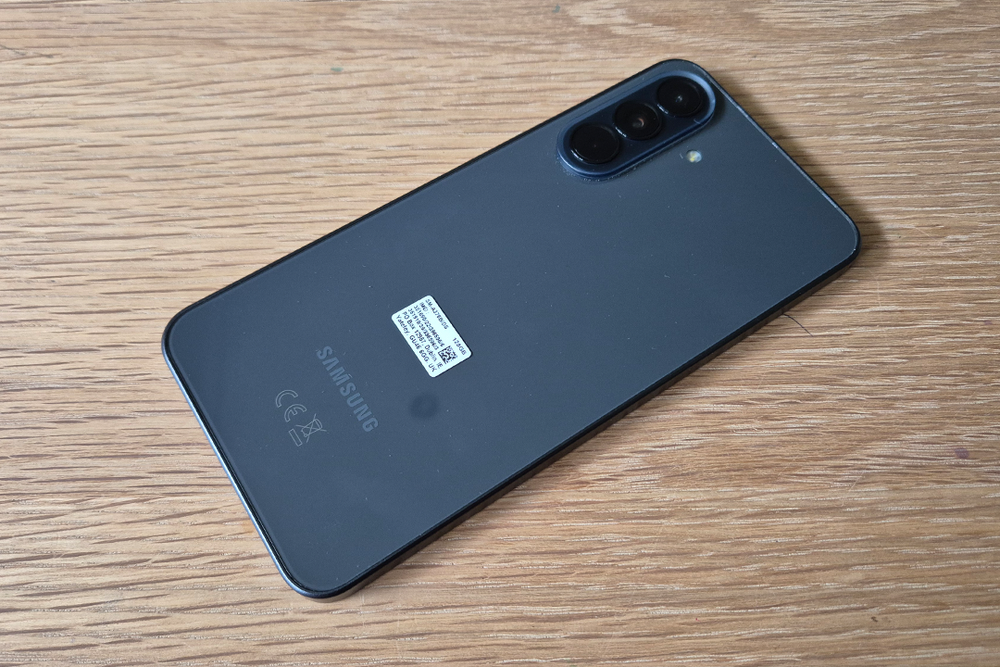
The Samsung A37 is pleasing on the eyes. It comprises a plastic frame with a glazed ceramic aesthetic, similar to the more expensive S-series but without the metallic finish. Importantly, the sides feel grippy and solid, while the rounded edges offer comfort in the hands, even during longer sessions.
The 6.7in front panel also features Gorilla Glass Victus, which will help protect against scratches, cracks and reportedly 2-metre drops onto hard ground.
On the rear is a trio of snappers surrounded by an island, the main camera being a 50MP lens. The camera bump does create an uneven surface, causing the phone to rock awkwardly against the lenses when placed on a table, so a phone case is a crucial investment. On the right side is your volume rocker and Google Gemini AI search button.
It strikes a fine balance between being light and comfortable and having a little heft to signify its quality. One small sign that betrays its non-flagship status is the slightly wider bezel, but at least the selfie camera is a punch-hole design rather than an unsightly notch that extends to the top bezel. The worst part of the design? It’s the plastic gloss back, which makes it a magnet for fingerprints and smears, so if you don’t wish to be rubbing your phone on your shirt every so often, invest in a case.
I’m also surprised by its large size. At 162.9 x 78.2 x 7.4mm, it’s actually slightly taller and wider than my Galaxy S24+, making slipping it in smaller trouser pockets quite uncomfortable and unwieldy, particularly for jeans wearers.
At least the Super AMOLED screen is bright and vibrant, though you won’t get to enjoy much of it outside the lock screen and Google Maps, courtesy of the Balance OS. Plus there’s a refresh rate of 120Hz, which keeps the screen experience fluid and smooth.
Balance Phone: Software
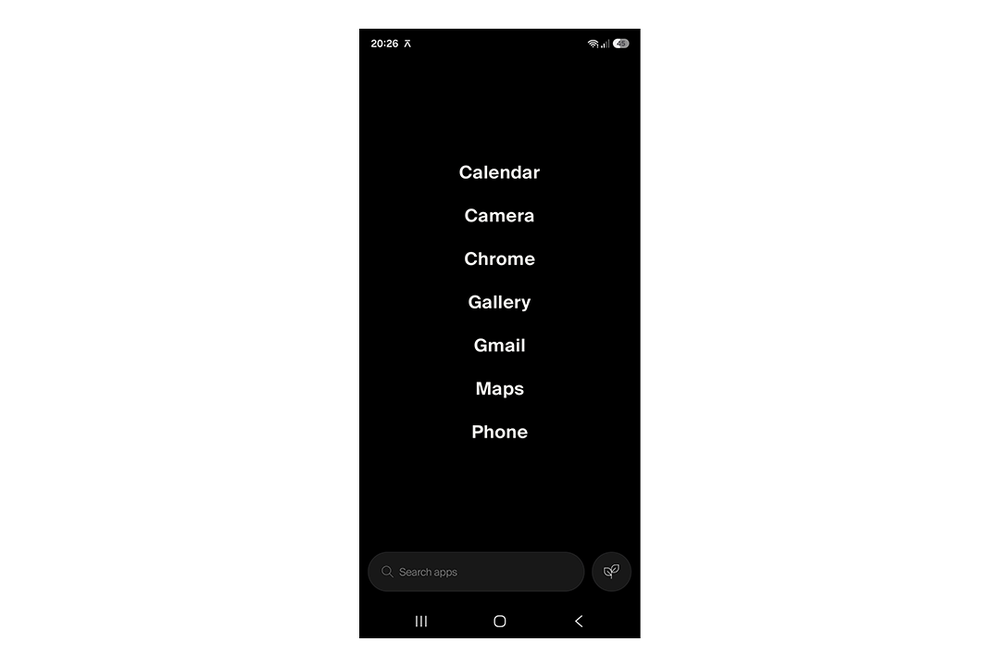
With the Balance OS, once you unlock your phone, you’ll be greeted with a black homescreen, which has been stripped down to a black menu screen displaying a list of apps using white text. No colours, no icons, no distractions or stimulation. Its mundane UI does help keep your gaze away from your phone, which I found great for pushing me to get on with my day. Still, I can’t help but miss my memes and Reels, which get me through the day’s monotony and “isn’t all this a mess” world catastrophising.
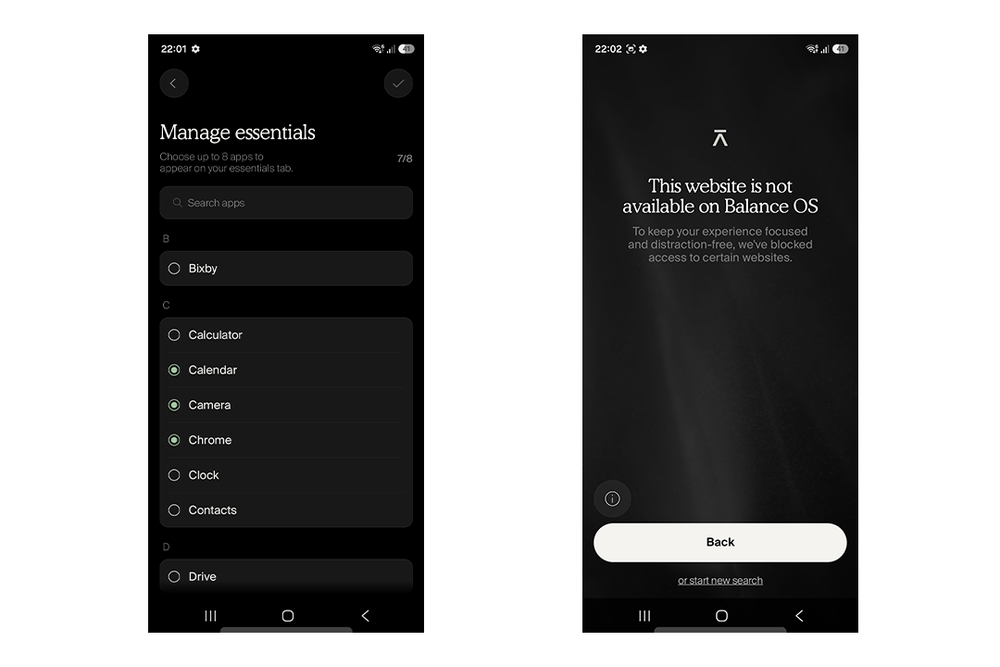
This OS does exactly what it promises, restricting access to the app and website versions of any entertainment, gaming, streaming and social media platforms. A visit to Instagram.com quickly returned me to a “Website restricted” message, before dumping me back into my Google Chrome search window. The home menu lets you list up to eight of your favourite unrestricted apps, which occupy the screen in text form without any colourful, stimulating icons.
Importantly, all apps are banned. No social media. No streaming. No games or gambling. And definitely no porn. Say goodbye to Instagram, TikTok, Snapchat, Facebook, YouTube, Tinder, Bumble, Netflix, even Minecraft. But what you do have is a step up from proper dumbphones, as the likes of WhatsApp, Teams, Slack, Strava, Uber, Maps, Spotify and the like are all allowed.
Obviously, if you miss sharing memes with your loved ones and watching the latest Hot Ones on YouTube, the Balance Phone isn’t for you — it’s an uncompromising 100% culling of anything addicting or entertaining. For me, I could see the benefit, as I’m usually caught scrolling through Instagram Reels on my commute, at lunch, even first thing in the morning.
Balance Phone: Cameras
Snapper quality is generally solid with the A37, though it’s not quite up there with the flagships like the Samsung Galaxy S26 or iPhone 17 Pro. Pictures come out detailed, sharp and natural with the main 50MP snapper, with the right level of colour and dynamic range. The 2x and 4x optical zoom is also there to help with compositioning, and you can eke out a fair bit of clarity and detail if you don’t manually zoom in too much post-shot, though 4x is. The 10x digital is good in a pinch, but there’s too much grain and noise to yield superior shots.

The superwide 0.6x also captures a decent field of view, but there’s a fair bit of edge distortion and a lack of fine clarity and sharpness overall, particularly in object and subject edges. The 12MP selfie cam also returns vibrant shots that show skin and colours accurately in detail without over-egging things.
Balance Phone: Performance and battery life
The Samsung A37 is quite zippy when navigating apps without any others running in the background. This included switching between camera modes and galleries. When you have several apps at a time, there can be micro-delays in responses, but they rarely feel inconvenient. With the Balance Phone, you also don’t have to worry about performance issues for streaming or gaming.
And thanks to the restriction on video content and social media, battery life is one of the best parts of a Balance Phone-enabled A37. The 5,000mAh battery can easily last two days on a single charge without needing to be rinsed with games or videos. It’s a shame there’s no wireless charging, but plugging in a wire every two days isn’t a huge effort.
Key specifications
Buy now £379, Thebalancephone.com
Your questions on the Balance Phone answered
Should you buy the Balance Phone?
The Balance Phone doesn’t give you the option of using a PIN to unlock those dopamine-dripping social media and TikTok-esque platforms. Nor does it allow for a timed cooldown of restricted apps or a maximum daily window to consume them. You’re just cut off from such apps and websites completely. So if you’re just looking to cut down on your use, you’ll fare better elsewhere.
If you’re really serious about going digital cold turkey (but still need to be reachable), the Balance Phone might be the one for you. It’s certainly one I’m considering giving to my kids when they step foot into the murky world of phone ownership. The strict censoring is one I can wholeheartedly recommend for younger eyes, and it reassures me that there’s no code they can hack and that there are no time limits or dodgy screens to police.
How I tested the Balance Phone
I used the Balance Phone as a secondary phone for more than a week, using a separate SIM card. During testing, I considered the following criteria.
What apps can I access?
You can generally access apps classified as essentials, communication, mobility, education or services, which include Camera, Weather, Notes, Messages, WhatsApp, Google Maps, Strava, Drive, Chrome, Revolut and Spotify.
The Balance OS blocks apps classified as social media, pornography, betting, video games, streaming and dating, and those include X, OnlyFans, 888 Casino, Candy Crush, Roblox, YouTube, Tinder and Grindr.
The full list of allowed and restricted apps is available on thebalancephone.com.
Why you can trust IndyBest reviews
IndyBest is The Independent’s reviews section, where experts test products to find out if they're worth your time and money. Matt Ng is a writer specialising in tech, having reviewed wireless chargers, VR headsets and more. For this review, he put the Balance Phone through its paces in a full review, giving you his honest verdict on both the phone and the Balance OS.
Want more recommendations? Check out our guide to the best tablets