In September, someone in Malaysia posted on r/Bolehland looking for a graphic designer. They had a banner design ready ("made by chatgpt lol") but needed "the working/AI file so the printer can proceed", urgently, on a budget of RM100 to RM150. If you plan to send a ChatGPT banner straight to the printer, you will probably hit the same wall.
When a printer asks for an "AI file", they mean an Adobe Illustrator file. It has nothing to do with artificial intelligence. A ChatGPT image is a flat picture made of pixels: sharp on a phone, soft at banner size, and the words inside it can't be edited.
What printers mean by an "AI file"
Adobe describes AI as "the proprietary Adobe file type suitable for vector artwork". A vector file stores shapes and letters as maths, so it stays sharp at any size, which is why printers like it for banners and signboards.
Malaysian printers publish their rules. This is part of e-banner Malaysia's artwork guide as it read on 6 October 2026:
Resolution: Artwork's resolution should be at least 150 dpi.Outline Shape: All letters must be created in outline shape.Scale: Artwork should be created in actual size in 1:1 scale.File Format: .jpg / .png / .eps / .ai / .pdf / .zip / .psd
Source: Artwork Requirements, e-banner Malaysia
Imagemagic, another Malaysian printer, lists "PDF preferred; AI, PSD or high-resolution JPEG also accepted" for buntings and says to "outline all fonts before export".
Both will take a high-resolution JPEG, so the file type is the smaller problem. Size and text cause the trouble.
Why a ChatGPT banner fails at print size
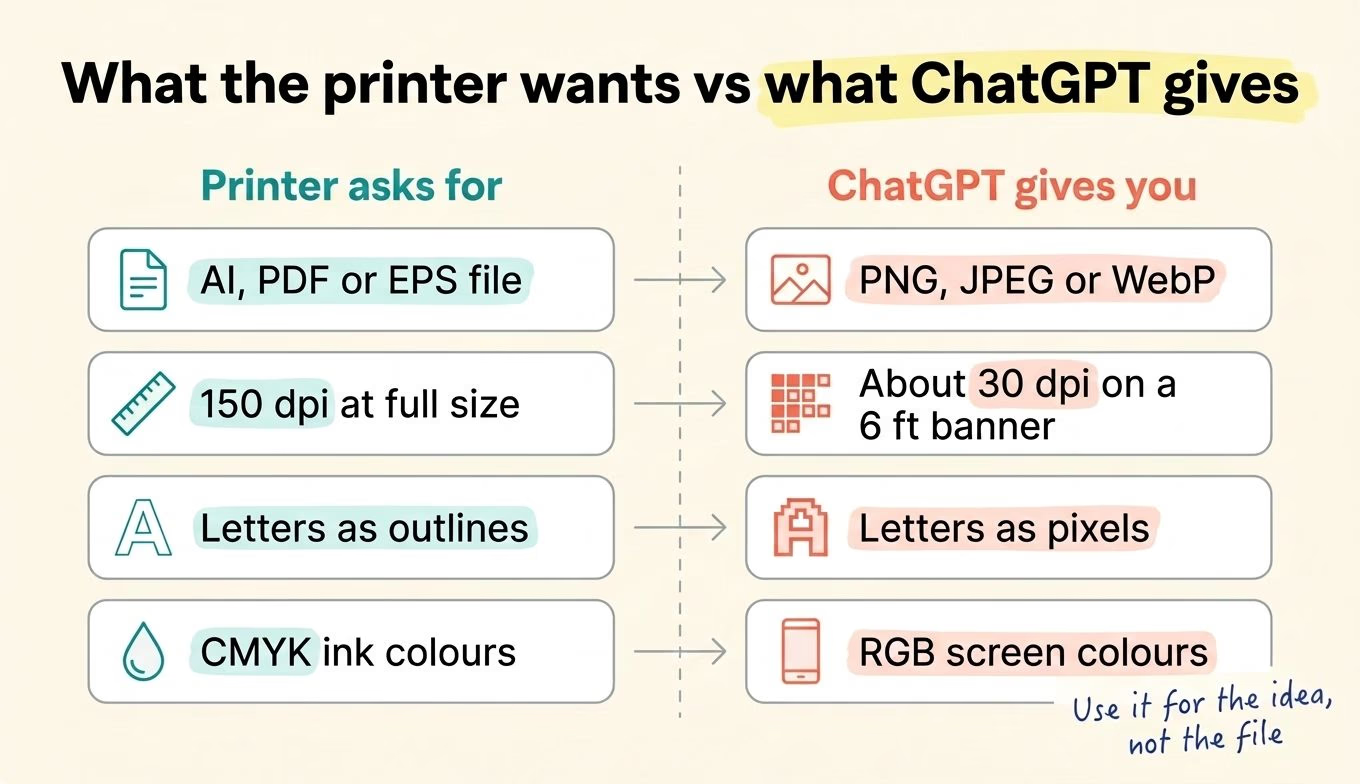 Four gaps between a ChatGPT image and a print file.
OpenAI's image models save PNG, JPEG or WebP files, up to 3,840 pixels on the longest side.
Take a common 2 ft by 6 ft bunting. Six feet is 72 inches, so at e-banner's 150 dpi the long side needs 10,800 pixels. We asked ChatGPT for exactly that banner on 6 October 2026, and it gave us a 2,172 by 724 pixel PNG. Stretched across 72 inches, that is about 30 dots per inch. Even the 3,840-pixel maximum gives about 53. That might pass from across a car park. At arm's length, edges go soft and small print blurs.
Colour is the other catch. ChatGPT gives you screen colours (RGB), while printers use CMYK inks. e-banner converts RGB files "without prior notice" and will not reprint or refund for colour differences, and a bright blue on your phone can come out duller on vinyl.
The text problem is the one that costs money
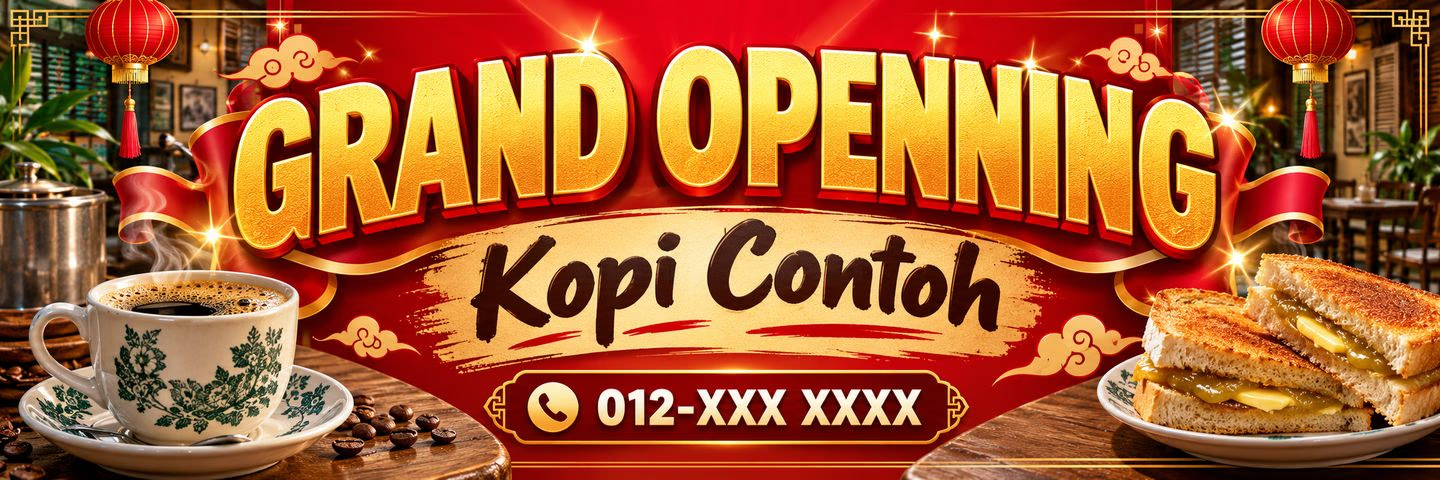 The banner ChatGPT made for us, 2,172 by 724 pixels. We asked for the "OPENNING" typo on purpose.
In a ChatGPT image, your shop name, phone number and prices are pixels painted to look like letters. If one digit of your WhatsApp number is wrong, the printer can't click on it and retype it. You regenerate, and the whole design shifts.
An upscaler won't rescue small text either. It's a tool that enlarges a picture by guessing the missing detail, and it does a fair job on a photo-style background. On small letters it can guess the wrong shape, which is how a 6 turns into a 5.
That's why printers want letters as outlines, and why the r/Bolehland poster needed the design rebuilt "as close/similar to the original as possible". ChatGPT does spell much better inside images now (see our look at ChatGPT Images 2.0 for marketing teams), but the letters still can't be edited.
How to print a ChatGPT banner without the last-minute rush
- Ask the printer for their artwork rules before you write a prompt: size in feet, file type, dpi and bleed (the extra margin they trim off). Many Malaysian printers list these on their site.
- Generate in the banner's shape. OpenAI's models accept ratios from 1:3 to 3:1, so a 2 ft by 6 ft bunting fits. A square image cropped later loses its edges.
- Use the image as a sketch. Put it in Canva or Illustrator as a background or guide, then type the shop name, prices and phone number as real text and drop in your real logo file.
- Export what the printer asked for, at full size. Zoom to 100% and read every word and number before you send it.
- Or give it to a designer as the brief. It saves them a round of guessing what you want. Book it before the event week, while there's still time to check the proof.
Running a food stall? Keep the food photo real even when AI does the layout.
Our take: the print file is still a production job
We use AI tools every day at Gotchaa Lab, for code and for video. They get you a convincing first version in minutes. The part that has to be exactly right still needs someone to check it.
A banner is a small example. The layout idea used to cost a designer's first round; now it costs a prompt. The file the printer needs, at full size, with real text and colours set for ink, is still work for a person with the right tool. Budget for it from the start, like the vinyl. An RM150 fix hurts less than finding the wrong phone number on a printed bunting.
If you're working out where AI fits in the rest of your marketing, talk to us. We'll tell you where it holds up and where it still needs a person.